
Elevate Your Photography Career and Create Momentum
Class One: EMail Practices.
Meeting Notes
Quick recap
Don led a meeting focused on client outreach strategies, providing guidance on email marketing best practices and introducing MailerLite as the preferred email service platform. The team discussed email template design, content creation, and the importance of personalizing initial client contacts, with Don sharing a motivational story to encourage perseverance. The group explored ways to showcase their skills through photography and other creative projects while discussing the impact of AI on their industry, and agreed to test and share their email templates for feedback.
Next steps
- All participants: Research and sign up for an email marketing platform (MailerLite, Brevo/Sender, or MailChimp), evaluate features (especially landing page creation for MailChimp), and report back to Don/Trish with findings.
- All participants: Design and create email templates for client outreach, including logo, headline, subhead, 3 paragraphs, and 1-3 images (600px wide), and share links/screenshots of templates in the Facebook group for feedback.
- All participants: Begin building a list of potential client contacts using tools like Perplexity and Google Maps, aiming to send 5 emails the second week, 8 the week after, etc., and track progress.
- All participants: Send initial personalized outreach emails (with images) to potential clients from personal/business email, clearly stating intent to add them to the list and providing an unsubscribe option.
- All participants: Send a second follow-up email (with different content and images) two weeks after the first if no response, then add non-objecting contacts to the email marketing platform list.
- All participants: Post in the Facebook group at the end of each two-week period the number of people contacted, for group accountability.
- All participants: Test subject lines using resources like subjectline.com and/or the Facebook group, and select effective headlines for outreach emails.
- Laura: Monitor the Facebook group for false spam flagging and ensure posts are published promptly.
- Don: Send subscription link for Excellent AI to Michael within 20 minutes.
- Don: Post a follow-up video/poster in the Facebook group next week with further instructions and resources.
- Trish and Don: Meet next week to discuss the Insta360 camera and image transfer issues.
- All participants: Provide feedback on Jessica’s shot list/test images in the Facebook group thread.
Summary
Client Email Outreach Strategy
Don announced that team members would begin client outreach emails the following week, starting with building their email contact lists. He recommended MailerLite as the preferred email service due to its automation capabilities, noting it’s free for up to 500 subscribers. Don shared a motivational story about a runner with cerebral palsy to encourage the team to persevere with the challenging task of sending client emails.
Email Marketing Strategy Best Practices
Don advised on email marketing best practices, emphasizing the importance of personalizing initial contact with clients before adding them to a mailing list. He recommended sending two personal emails before adding contacts to MailChimp or similar platforms, with a one-month interval between outreach attempts. Don also provided guidance on designing email content, suggesting that images should be arranged in a cohesive manner rather than as separate shots, and recommended building a mailing list of 100 contacts by the end of February.
Enhancing Photography Skills and Outreach
Don discussed the importance of demonstrating one’s skills and creativity, even when working on hypothetical or imaginary projects. He encouraged Inga to showcase her flower photography skills in a way that demonstrates her thought process and problem-solving abilities. Don also emphasized the power of positive affirmations and setting realistic goals, suggesting that photographers should aim for a manageable number of clients rather than an unrealistic number. He provided a template for cold outreach emails, which includes an introduction, specialty paragraph, business paragraph, and a customizable call to action. Don advised participants to modify the template as needed and to use ChatGPT to generate additional headline ideas.
Email Marketing and AI Strategies
The group discussed email marketing strategies, focusing on creating effective subject lines and email templates. Don shared tips on using various AI tools for writing and designing emails, emphasizing the importance of including photographs to make emails stand out. The team agreed to test and share their email templates in a Facebook group for feedback. They also discussed the growing demand for photography services and the potential impact of AI on their industry. Don encouraged the group to be proactive in seeking work and to track their outreach efforts for accountability.
Welcome to the first week of January, 2026.
Week One: No activity, build your offering.
Week Two: 5 client contacts… all in one day, or one a day, or whatever.
Week Three: 8 cient contacts.
Week Four: 8 client contacts.
These will be mostly by email, so use the template ideas in the workbook to get started.
Three Invaluable Prompts
PROMPT 1 — The Relevance Filter
(Fixes “me-focused” emails)
Use this when:
Your emails talk too much about yourself and not enough about the client.
Prompt:
You are a creative director at a small brand or business.
I am a photographer about to email you.
Based on the information below, tell me:
What would make this email feel immediately relevant to you
What would make you ignore it
One angle I could use that would feel useful, not promotional
Here is what I know about the client:
– Industry:
– Size of business:
– Type of visuals they use now (if known):Here is my current draft email:
“[paste draft here]”Be blunt. You are busy. You owe me nothing.
Why it works:
It forces you to think like buyers, not hopeful sellers.
PROMPT 2 — The Cold Email Builder (No Fluff)
(Stops rambling and over-explaining)
Use this when:
If you tend to overwrite, apologize, or get too in the weeds.
Prompt:
Write a cold intro email from a commercial photographer to a potential client using these constraints:
– Maximum 90 words
– One clear reason for reaching out
– One relevant proof point
– One simple call to action
– Professional, calm, confident tone (no hype)My niche:
Type of client:
Type of work I want:
Portfolio link or example:
Write two versions:
Slightly formal
Slightly conversational
Why it works:
Constraints kill insecurity. This forces discipline and confidence.
PROMPT 3 — The Follow-Up Without Shame Prompt
(Fixes avoidance after no reply)
Use this when you have been asked for more information and the client disappears.
There is always a reason, but most of the time it isn’t what we think.
Prompt:
A possible client sent me this email:
[paste in the email sent]I sent the email below and did not get a response.
Original email:
“[paste email here]”Write 3 follow-up messages that:
– Feel human, not salesy
– Add light value or context
– Respect the recipient’s time
– Do not apologize or begSuggested follow-up timing:
– Follow-up 1: 7 days
– Follow-up 2: 14 days
– Follow-up 3: 30 daysKeep each message under 60 words.
Why it works:
It normalizes follow-up as professionalism, not desperation.
Mark Manne's Email
WHY EMAIL IS SO IMPORTANT
Consistent, well-managed email outreach is one of the few things photographers can control in a business full of variables. Not algorithms. Not referrals. Not hope. A simple, steady outreach habit keeps your name circulating in the right rooms while everyone else waits to be “discovered.” This isn’t about blasting lists or pitching desperation—it’s about showing up calmly and professionally, over time, so when a need arises, you’re already familiar.
Think of email outreach as a low-volume, high-intent drip. One touch at a time. Relevant, restrained, and respectful.
A brief note.
A specific connection.
A reason you belong in their inbox.
When done right, it doesn’t feel like marketing, it feels like awareness. You’re not asking for work every time; you’re reminding them that you exist, that you work in their world, and that you understand what they need visually.
The real power comes from consistency.
“Three Contacts Per Day”
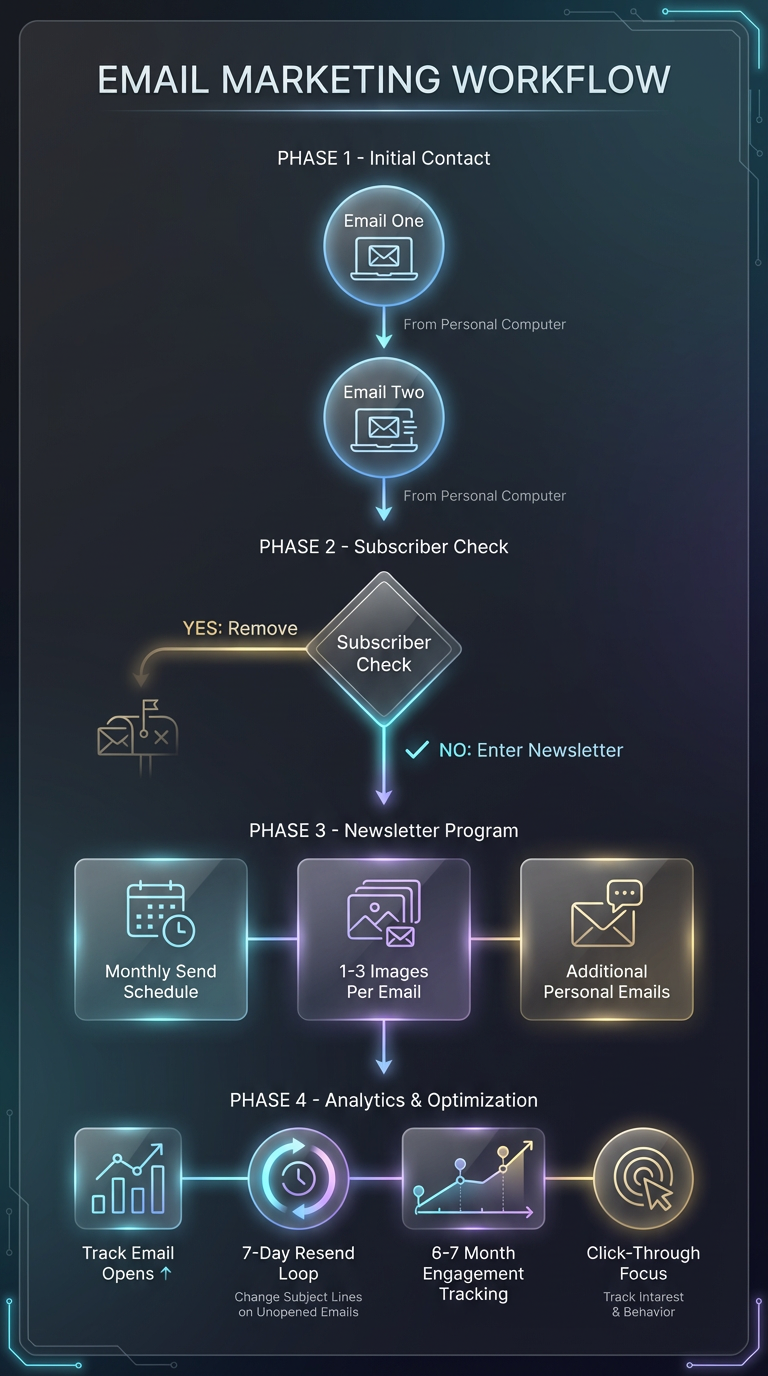
If you send three marketing and introduction emails per day, just ten minutes of time, you will have contacted sixty possible clients per month. Just three per day… no weekends for this, use the weekends for finding clients and photographing.
60 per month / 180 per quarter / 720 per year… And those numbers guarantee some action.
This first week:
Open an account at an email service and get familiar with it.
EMail Providers: An overview.
For Mailchimp-style email marketing with a solid free tier, the top options are MailerLite, Brevo, Sender, GetResponse, AWeber, Omnisend, and EmailOctopus. Each one has a different angle (automation depth, ecommerce tools, or sheer free volume), so the “best” depends on list size and how sophisticated you want your funnels to be.
Best Mailchimp-style free plans
-
MailerLite – Very user-friendly builder, automation, and landing pages, typically with a free tier around 500–1,000 subscribers and enough sends for basic newsletters and welcome sequences.
-
Brevo (formerly Sendinblue) – Strong for transactional and marketing email with unlimited contacts and a daily send cap on the free plan, plus basic automation and SMS options.
-
Sender – Extremely generous free plan (often up to ~2,500 subscribers and 15,000 emails/month), with automation and ecommerce-focused features at the free level.
-
GetResponse – Free plan geared toward small lists (~500 subscribers) with newsletter sending and basic funnels, a decent on-ramp if you might later want more advanced automation/webinars.
-
AWeber – Free for small lists (~500 subscribers, a few thousand emails/month) and known for a big template library and simple automations.
-
Omnisend – Built for ecommerce; the free plan is smaller (e.g., a few hundred contacts or emails/month) but includes automations and ecommerce triggers like abandoned cart.
-
EmailOctopus – Popular “no-frills” Mailchimp alternative; free tier for a few thousand subscribers with provider branding, with paid plans still on the inexpensive side.
Picking the right one for you
-
If you want the simplest Mailchimp-like UX for creator newsletters and basic lead magnets, MailerLite or EmailOctopus are good starting points.
-
If you’re leaning into ecommerce and automations tied to purchases, Omnisend, Sender, or Brevo will feel more tailored.
-
If you anticipate scaling into more advanced funnels/webinars, GetResponse or AWeber give a smoother upgrade path beyond the free tier.
Email Providers: Fits Your Needs the Most
For a 500-subscriber list sending one campaign per month, MailerLite and EmailOctopus are usually the easiest, most “set-and-forget” options, with Brevo as a flexible third choice.
Recommended options
-
MailerLite – Very clean interface, visual automation, and landing pages; its free plan typically covers around 500–1,000 subscribers with enough monthly sends for your 1×/month cadence.
-
EmailOctopus – Simple newsletter-focused tool with a generous free tier (often a few thousand subscribers and limited monthly sends), more than enough for 500 contacts at 1 send/month.
-
Brevo – Unlimited contacts with a daily send cap; at 500 subscribers and one monthly send, you stay well under the free limits, and you also get transactional email if needed later.
How to decide
-
Choose MailerLite if you want built-in landing pages and slightly richer automation for things like a welcome series.
-
Choose EmailOctopus if you prefer a minimal UI mainly for simple broadcasts and occasional sequences.
-
Choose Brevo if you might add transactional or ecommerce emails down the road.
Cold Emails are extremely important.
Here is our first cold email Prompt to get you going.
PROMPT ONE
Cold Outreach Email Generator for Photographers (with Tone Control)
ROLE
You are a senior creative director and photographer’s rep who specializes in cold outreach that actually gets replies. You understand how photographers earn attention through relevance, clarity, and restraint—not hype or begging.
INPUT (Photographer will provide)
Name
City / State
Specialty (food, product, lifestyle, portrait, tabletop, etc.)
Type of client being pitched (local business, brand, agency, marketing team, etc.)
Type of work being sought (one-off project, ongoing content, campaign, retainer, test shoot, etc.)
Tone preference (choose one):
A. Conservative / Corporate – polished, safe, credibility-forward
B. Friendly / Local – warm, human, conversational
C. Bold / Challenger – confident, direct, slightly disruptive (never arrogant)
TASK
Write a cold outreach email designed to start a professional conversation with a new client.
This email should:
Respect the recipient’s time
Make relevance obvious within the first few lines
Avoid hype, fluff, or desperation
Sound like it comes from a working professional, not a template library
Adapt word choice, pacing, and confidence level to match the selected tone.
OUTPUT FORMAT
(Use these exact sections and labels)
- Primary Headline
- Short, specific, and attention-holding. No buzzwords.
- Subheadline
- One line that clarifies relevance to the client’s business
- Intro Paragraph
- A brief, human introduction: who the photographer is, where they’re based, and why this email makes sense for this client
- Specialty Paragraph
- Clearly explain what the photographer does well and how that specialty supports the client’s goals.
- Business Pitch Paragraph
- Connect the photography to a concrete business outcome (clarity, consistency, credibility, conversions, efficiency, etc.).
- Call to Action
- Low-pressure, specific, and easy to say yes to.
(This can be customized by the photographer)- Bonus Section
Provide 5 additional head-turning headline options written in the same tone.
STYLE RULES (Non-Negotiable)
- Cold email appropriate
- No exaggeration
- No “just checking in” language
- No attachment mention unless asked
- Confident, calm, professional
- Short paragraphs, clean rhythm
Do not delay, get on this for the coming week.
How it Worked for Me
Primary Headline
Strong food and product images aren’t decoration—they’re your infrastructure
Subheadline
Clear, consistent food and product photography for businesses that love profit.
Intro Paragraph
I’m Don Giannatti, a Phoenix-based food and product photographer. I work with restaurants and small manufacturers who need images that do more than decorate a website; they need visuals that carry their marketing.
I’m reaching out because businesses like yours are usually juggling menus, promotions, packaging, and social content with visuals that don’t quite keep up.
Specialty Paragraph
I specialize in clean, controlled food and product photography designed for advertising and promotional use. That means images built to work across menus, websites, packaging, and ongoing campaigns—not one-off “pretty shots” that don’t translate to sales or consistency.
My focus is simple: make what you sell look accessible, intentional, and worth choosing.
Business Pitch Paragraph
Most restaurants and manufacturers don’t need more photos—they need fewer, better ones that can be reused across channels without falling apart. That’s where I come in.
I help businesses replace visual guesswork with a reliable system: photography that supports promotions, builds brand consistency, and reduces the scramble every time something new needs to go out the door.
Call to Action
If this sounds useful, I’d be happy to have a short conversation and see if there’s a fit.
No pitch—just a quick look at what you’re doing now and where stronger visuals could help.
(You can adjust this to your preference.)
Bonus: 4 Additional Head-Turning Headlines
-
Your marketing works harder when the photography isn’t holding it back
-
If your visuals feel inconsistent, your brand probably does too
-
Photography built for promotion, not just admiration
-
When visuals are clear, selling gets easier
A Shorter 90 Word Email
Primary Headline
If your visuals feel inconsistent, your marketing probably is.
Subheadline
Food and product photography built for promotion, not decoration.
Intro Paragraph
I’m Don Giannatti, a Phoenix-based food and product photographer. I work with restaurants and small manufacturers who need images that actually support their marketing—not just fill space.
Specialty Paragraph
My focus is clean, controlled photography designed for advertising and ongoing use—menus, websites, packaging, and promotions—so your visuals stay consistent and credible.
Call to Action
If it makes sense, I’d be happy to have a short conversation and see where stronger visuals could remove friction.
(Customize as needed.)
A 90 Word Short for Manufacturing and Small Business in the Industrial Market
Primary Headline
If your product is solid, your visuals should prove it.
Subheadline
Industrial product photography built for marketing and sales use.
Intro Paragraph
I’m Don Giannatti, a Phoenix-based product photographer. I work with small manufacturers whose products are well-engineered but visually underrepresented in their marketing.
Specialty Paragraph
I create clean, controlled product images designed for websites, spec sheets, presentations, and promotions—photography that explains, clarifies, and builds confidence.
Call to Action
If it’s worth a brief conversation, I’d be happy to look at what you’re using now and see where stronger visuals could help.
(Customize as needed.)
The Right Structure (Don-Approved)
Headline
Direct. Business-facing. Sets expectation.
Image Canvas (1 file, 3 images)
- Same lighting family
- Same background tone
- Different viewpoints or use case
- Hero produc
- Detail / precision
- In-context or functional angle
Three Short Paragraphs
- Who you are / why this is relevant
- What you specialize in (industrial clarity, not “beautiful images”)
- How it helps sales, marketing, or credibility
Call to Action
Low-pressure. One step.
This mirrors how buyers evaluate vendors, not how photographers show off.
Critical Rules (Don’t Skip These)
- Inline image, not attachment
- Keep the file under ~700 KB
- Alt text that describes function, not art
(“Precision-machined component photographed for product marketing”) - No more than one image canvas
- One per month is good, Less they forget, more is spam.
One Strategic Pushback (Worth Considering)
For true cold outreach, I’d suggest two versions:
Version A: Text-only (first touch, safest deliverability)
Use the 90 Word version for quick scanning. If they do not ‘unsubscribe,’ then add them to the list.
Version B: Image canvas (second touch or warmed list)
That gives you:
- Deliverability protection
- A/B insight
- A reason to follow up without “just checking in”
Bottom Line
Your layout:
Headline → Image Canvas → 3 Paragraphs → CTA
… is exactly how a confident professional communicates.
It doesn’t beg.
It doesn’t overshare.
It doesn’t look like marketing fluff.
The Ideal 3-Image Canvas
Think in terms of Decision → Confidence → Proof.
Frame 1: The Hero (Decision Image)
What it proves:
“I understand how to present your product clearly and professionally.”
Characteristics
- Clean, controlled lighting
- Neutral or brand-appropriate background
- Full product, no gimmicks
- Balanced, intentional composition
Buyer takeaway:
This looks credible. I can put this on our website or sales materials immediately.
Frame 2: The Detail (Competence Image)
What it proves:
“I I can find even more to impress viewers.”
Characteristics
- Tight crop or macro
- Shows texture, intricate design, dimension
- Lighting reveals precision
- Zero clutter
Buyer takeaway:
They understand what matters to engineers, buyers, and spec-driven decisions.
Frame 3: The Context (Use / Scale Image)
What it proves:
“I think beyond the simple object.”
Characteristics
- Shows scale, use, or environment
- Could be lightly staged or implied context
- Controlled
- Supports understanding.
Buyer takeaway:
This photographer can help explain our product, not just photograph it.
Why This Sequence Works
- Hero earns attention
- Detail builds trust
- Context removes doubt
Together they answer:
“Can this person make our product easier to sell?”
That’s the real pitch.
Design Rules for the One Canvas file.
Portrait view preferred.
- Even spacing. No borders or drop shadows.
- Visual rhythm matters more than symmetry.
- Same lighting language across all three frames.
If it feels like a mini sell sheet, you’re doing it right.

Making sure the email image block tells a story, or shows the clients how you work, is very important.
I like three imagres.
I like one landscape and two portraits.
Because…
Two landscapes always looks like not enough, and they are stacked on each other… three landscapes take up too much space, and portraits are worse. Three portraits would extend to a very large, and heavy, image.
Important also.
Any emails we get are constricted to 600 pixels wide.
Yep… 600 pixels.
This is the image at 600 pixels:

This also reinforces the plan of getting more than one shot when you work on portfolio stuff. Every portfolio shoot you do should give you five or so images, hopefully more.
Hero shots, close-ups, cropped squares, leaving room at the top or bottom for type, medium shots, adding a kicker… and on and on.
Meeting Recap
Quick recap
The team discussed email marketing strategies and software options, focusing on segmenting clients and creating effective lead magnets for their photography business. They explored various approaches to lead generation, including the use of email marketing versus traditional methods, and emphasized the importance of engaging with potential clients through personal and targeted communication. The group also covered business card design and website development, with Don offering to help Laura overcome her website development challenges and schedule a follow-up meeting to work on her site.
Next steps
- Trish: Test sending emails through MailerLite to Don to check if manual email additions are allowed
- Don: Put up the document on lead magnets and related graphics for the group to access
- Don: Work on Michael’s website and have it ready for Michael to view by Monday afternoon
- Michael: Start pushing through the rest of the email/marketing process once website is ready
- Don: Come up with more ideas for lead magnets and share with the group
- Laura: Schedule and meet with Don on Thursday at 11am (Laura’s time) to work on website
- All participants: Begin sending 3 marketing touches per day (as per Don’s guidance)
- Trish: Create 4×5 card and business card for upcoming East Volusia County marketing meeting
Summary
Email Marketing Strategy and Segmentation
Don and Trish discussed fixing links in Don’s Substack email, with Don explaining he had already addressed the issue the previous night. They then discussed email marketing strategy, with Don advising to use the longer paragraph version for formal communications and the shorter 90-word version for quick introductions. Laura inquired about email segmentation, and Don recommended segmenting architecture clients separately from other niches like food and tabletop, while keeping food, product, and tabletop together as one niche.
Email Marketing Strategy Discussion
The group discussed email marketing strategies and software options, with Trish switching from MailChimp to MailerLite due to its stricter requirements for email lists. Don clarified that their approach is different from traditional email marketing, as they’re using email software primarily to make it easier to contact potential clients rather than build a newsletter audience. Laura initially misunderstood the project’s focus, thinking they were building a marketing list for newsletters, but Don explained they’re using email marketing as a point of contact for their photography business.
Email Lead Generation Strategies
The group discussed lead generation strategies, focusing on the effectiveness of placing lead magnets on websites versus emails. Don emphasized that while having a lead magnet on a website is possible, more traction is likely to come from email marketing, as it allows for personal explanation and targeting of potential leads. The importance of engaging with leads and removing inactive subscribers from email lists was highlighted by Terisha and Michael, who stressed the value of maintaining an active and interested audience. Don also shared insights from Mark Manis’s newsletter strategy, noting the difference between targeting clients directly and working through large ad agencies, and advised starting with shorter, more personal emails before evolving into longer, more detailed newsletters.
Photography Business Lead Magnets
The team discussed creating effective lead magnets for their photography business. Don suggested offering useful content like planning guides, promotional timing charts, and access to a library of stock images to attract newsletter subscribers. He emphasized that the lead magnet doesn’t need to be highly valuable to many people, as they are targeting photography clients. The group also considered offering discounts or coupons as incentives for signing up. Don shared a research-based report on the importance of photography for businesses, which could be used as a lead magnet.
Marketing Strategies and AI Development
Don discussed the importance of marketing and lead generation, emphasizing the need to reach potential clients through various channels, including direct mail and postcards. He shared his experience with a YouTube video featuring an AI-generated economist, highlighting the current limitations and potential future developments in AI-generated content. Don and Trish also discussed testing the process of manually adding subscribers to their email program, with Trish planning to test this process and report back on any issues encountered.
Email Marketing Strategy Discussion
Don and the team discussed the distinction between email marketing and marketing through email, emphasizing that email marketing typically involves large lists, which isn’t suitable for their service-based business. Don advised against spending significant resources on email marketing due to the risk of attracting the wrong audience. He also shared that he is working on Michael’s website and will have it ready for review by Monday afternoon. Trish inquired about video settings for her camera, and Don recommended starting with regular video rather than log format, explaining that log video requires extensive editing. Trish also considered attending a local business meeting and asked about business card design, to which Don suggested using one image on the front and one on the back for a 4×5 card.
Business Card Design Strategy
Don and Trish discussed creating a business card and promotional material. Don advised Trish to design a 4×5 inch card with a cool food photo, a brief description, and to clip a business card to it. He emphasized the importance of creative photography and avoiding cliched images like tacos. Don also shared his experience with the enduring use of business cards despite predictions of their obsolescence, mentioning how technology like Palm Pilots and Blackberries were once thought to replace them but didn’t.
Photography Lead Magnet Strategies
The group discussed creating and promoting lead magnets for photography services. Don suggested offering a free PDF guide as a lead magnet, which Laura proposed to include as a free download for website lead magnet opt-ins. They agreed to limit email promises to one monthly email and discussed placing lead magnet sign-ups in both email and Instagram campaigns. Trish considered offering a 10-minute consultation as a lead magnet, with Don advising to keep consultations brief to avoid spending excessive time on calls.
Website Development Support Planning
Don and Laura discussed Laura’s website development challenges, with Don offering to help her overcome analysis paralysis by starting with placeholder content and gradually improving it. They scheduled a follow-up meeting for Thursday at 11 AM to work on Laura’s website, with Don