
Elevate: February 14, 2026: A Referral System | Mini Porfolio Sessions
The Power of Referrals
Referrals Are an Engine for Growth
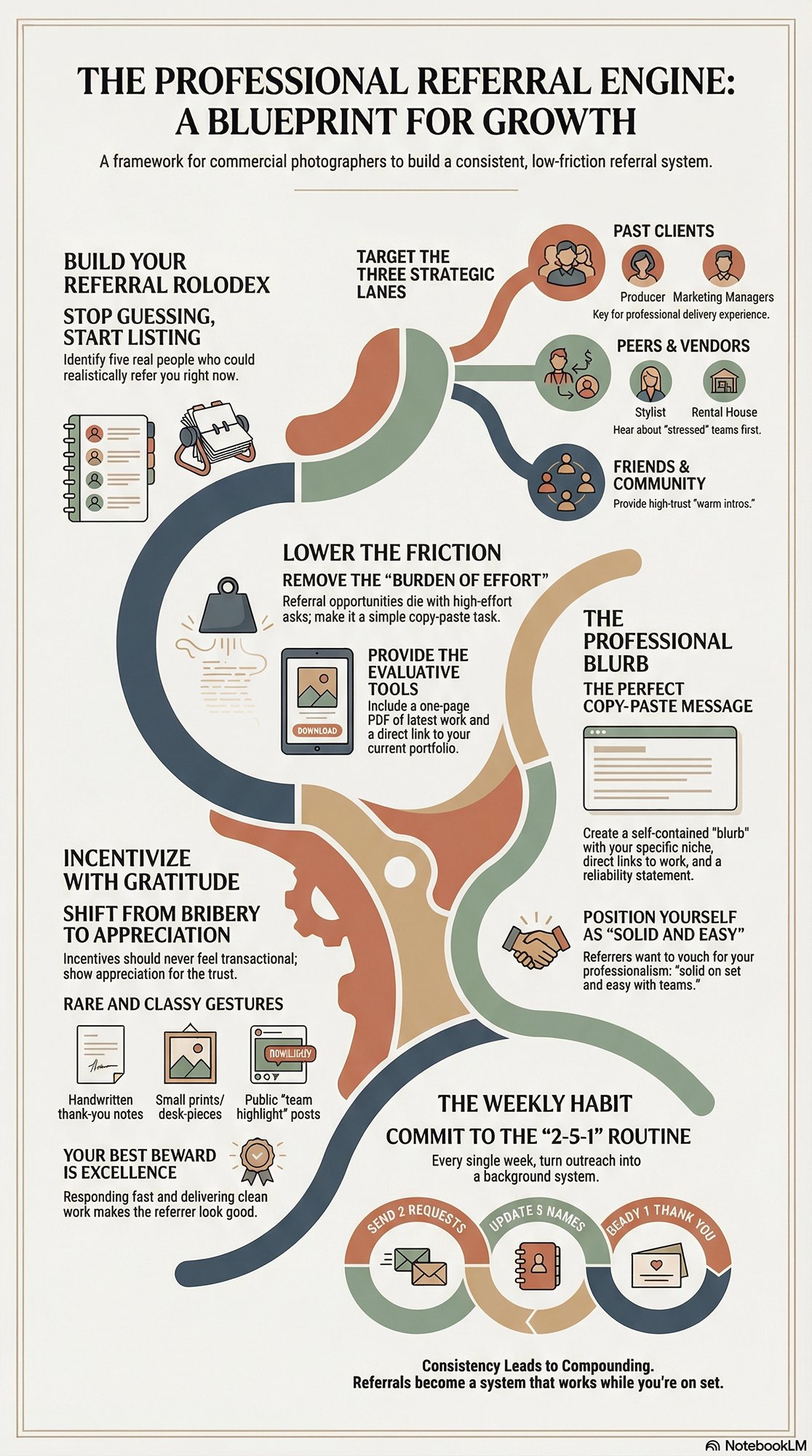
Referrals are the most underrated growth lever in commercial photography. They cost less than ads. They move faster than cold outreach. And they land warmer than almost anything else, because trust travels with the introduction.
But referrals don’t “just happen.” Not consistently. Not at the level you want. The good news is you don’t need a complicated system. You need a simple referral engine you can run every week, even when you’re busy on set.
Here’s the core idea: happy clients and supportive peers can become your best sales force—if you make it easy for them to talk about you, and easy for them to connect you to the right people.
Start with your Referral Rolodex
Your first job is to stop guessing and start listing. Referrals come from specific humans, not “the internet.”
Build a short Rolodex of five people who could realistically refer you. Not someday. Now.
Think in three lanes:
1) Past clients.
Art buyers, producers, marketing managers, creative directors. Anyone who has already hired you and had a good experience.
2) Peers and vendors.
Designers, ad agencies, branding studios, video teams, retouchers, stylists, makeup artists, set builders, print houses, rental houses, and producers. These people hear about shoots before you do. They know who is booking. They know who is stressed. And they know who needs a photographer they can trust.
3) Friends and community.
Not everyone can refer commercial work, but many can refer you to someone who can. One solid intro is enough.
For each person, write three things: their role, why they make sense as a referral source, and exactly how you’ll reach out. Text. Email. Coffee. DM. A quick call. Make it real.
Because “I should reach out” isn’t a plan. A date and a message is a plan.
Write messages you can actually send
Referrals die when the ask feels vague. Or awkward. Or high effort.
Your request should be personal, clear, and easy to act on. That’s it.
You want to give them a simple target and a simple next step.
Keep your sentences short. Make it human. And be specific about what you want more of.
Here are three templates you can adapt to your voice:
Template 1 (past client):
“Hey [Name]—I loved working on [project]. If you hear of a team needing commercial photography for [type of work], I’d be grateful for an intro. No pressure at all. If it helps, I can send a one-page PDF with my latest work and a quick blurb you can forward.”
Template 2 (peer/vendor):
“Hey [Name]—quick one. I’m taking on more [industry/type] shoots this quarter. If you run into a client needing a photographer who’s solid on set and easy with teams, I’d love to be your go-to. Want my current portfolio link and a short intro you can paste when making intros?”
Template 3 (friend/community):
“Hey [Name]—small ask. If you know anyone at a brand or agency who hires commercial photographers, I’d love a warm intro. I’m focused on [your niche] and I’m booking for [timeframe]. If you’d rather, I can send a quick message you can forward.”
Notice what’s happening here. You’re not begging. You’re not making it weird. You’re giving them tools. You’re lowering the friction.
Decide on an incentive that fits your brand
Incentives can help. They can also backfire if they feel transactional.
The goal is gratitude, not bribery.
A few options that feel clean for commercial photography:
- A handwritten thank-you note. Always classy. Always rare.
- A small print or a desk piece from a shoot. Thoughtful and on-brand.
- A credit toward future work (only if it fits your pricing structure).
- A behind-the-scenes frame or mini “team highlight” post (with permission).
Sometimes the best incentive is simply this: you make them look good. You respond fast. You deliver clean. You treat their referral like gold.
Make it a weekly habit
This system works when you repeat it.
Each week, do four things:
- Add or update at least five referral names over time.
- Keep 2–3 templates ready so you never start from scratch.
- Choose your thank-you method so you don’t overthink it.
- Send at least two referral requests. Every week.
Two asks a week is not aggressive. It’s consistent. It’s professional. And it compounds.
Use the reflection prompts to sharpen the engine
Ask yourself:
Who is already rooting for me?
What would make referring me simple?
How do I show gratitude without making it feel like a transaction?
If you answer those honestly, your referral engine becomes something people want to participate in. Because you’re easy to recommend. Easy to work with. And easy to trust.
Check the boxes. Build the list. Send the messages. Say thank you.
That’s it.
When you do this consistently, referrals stop being random. They become a system. And that system keeps working in the background—while you’re doing what you do best: making great work.
Meeting Notes
Quick recap
The meeting focused on updates and challenges related to website development, client referrals, and personal projects among the participants. Don shared his recent car accident experience and discussed the importance of airbags in vehicle safety. The group discussed issues with website templates, hosting services, and domain name servers, with Laura and Don offering technical support to Mike regarding his website hosting problems. Participants shared personal updates, including Laura’s recent purchase of a new home in Mobile, Alabama. The conversation also covered strategies for obtaining client referrals, with Don emphasizing the importance of handwritten thank-you notes and personal communication. The conversation ended with a discussion about the benefits of gentle exercise and proper hydration, with Don sharing his experience with Tai Chi and healthy coffee alternatives.
Next steps
- Inge: Wait for response from Pixyset support regarding logo resizing issue, and consider switching to a different template if the current one cannot be resolved.
- Mike: Contact GreenGeeks support again to request both GoDaddy and Sys name servers and provide them with login information; if unsuccessful, coordinate with Don to migrate the site to Don’s server.
- Laura: Send Mike (and Don) the correct GreenGeeks name server information for DNS setup.
- Laura: Email Don a link to her web copy in Google Drive for review.
- Inge: Send Don the link to her website once it is live.
- Don: Share Tai Chi warm-up links with Trish.
- Trish: If she has 24 or more images per category, split her website images into separate pages (e.g., food and product).
- All participants: Send out emails/DMs to contacts and friends to announce their photography services and request referrals, per Don’s guidance.
- All participants: Consider sending handwritten thank you notes or postcards to clients/prospects as outlined by Don.
- Don: Create and share a Google Doc (or Google Form) version of the mini-shoot planner/questionnaire for clients for all participants to use.
- Laura: Share her Google Document (occupational therapy intake form) with the group for reference/adaptation to photography client intake.
Summary
Car Accident and Website Issues
Don shared his experience of a recent car accident where his Ford Fiesta was damaged in a head-on collision, but all passengers, including his daughter and granddaughter, were unharmed due to the car’s airbags. Inge discussed issues with sizing her logo on her new website, which she built on the Pixyset platform using the Avery template. Don offered technical advice about CSS constraints and margins, suggesting that the issue could be resolved by adjusting the HTML code, and Inge mentioned waiting for a response from Pixyset support.
GreenGeeks DNS Setup Issues
Mike expressed frustration with GreenGeeks, a web hosting provider, due to issues with DNS configuration and service quality. Laura, who previously used GreenGeeks, recommended Mike try contacting them again and provided the name servers for his GoDaddy account, which Don could use to set up the DNS. Mike confirmed he was on the Eco Site Pro 50 plan, and Laura noted that GreenGeeks had recently upgraded their servers. Don mentioned finding a 30-day assignment and highlighted the importance of security due to the presence of nefarious individuals in the industry.
Client Referral Networking Strategies
Don shared strategies for generating referrals and building a client network, emphasizing the use of email and direct messages to reach out to contacts. He suggested creating personalized and handwritten thank-you notes to strengthen client relationships and highlighted the importance of including a photograph relevant to the recipient’s field. Don also recommended using branded materials like colored envelopes to make a lasting impression.
Personalized Client Engagement Strategies
Don discussed the importance of personalized client interactions, including sending handwritten notes and prints, and emphasized the value of building relationships through thoughtful gestures. He shared a past client experience and suggested offering incentives for referrals. Mikala and Trish agreed on the impact of handwritten items in a digital age, with Trish sharing a personal story about her husband. The group also briefly touched on the need to send out emails and prepare materials for an upcoming launch, with Mike being the only one currently unavailable due to other commitments.
DNS Configuration and Personal Updates
The team discussed domain name server configurations, with Laura providing guidance on which servers to keep (NS1 and NS2) and which to remove (CHI). Laura shared personal updates about buying a new house in Mobile, Alabama, which led to a discussion about real estate prices in different locations. Don expressed concern about the progress of the class, while Mikala confirmed she had secured a job through connections made during the class.
Photography Business Growth Strategies
Don shared insights on how photographers can expand their client base by showcasing their work beyond traditional wedding and baby photography, emphasizing the need to communicate the broader scope of their services. Mikala discussed her success in securing a job and shared her strategy of promoting headshot updates on social media. Laura inquired about the availability of a mini-shoot planner, and Don explained it was a JPEG image that could be copied and edited using text extraction tools on a Mac. Don also mentioned plans to provide a questionnaire template next week to help photographers improve client interactions and reinforce their professionalism.
Client Information and Portfolio Updates
Don discussed creating a Google Doc for client information and shared a template created by Laura, which others could modify. Trish considered increasing her outreach efforts, and Don encouraged her to split her images into food and product categories once she reaches 24 of each. The group confirmed the next meeting would be held every other week, and Don encouraged everyone to continue working on their portfolios. Don also shared his experience with Tai Chi exercises, which he credited with improving his health and circulation, and mentioned he would share the exercise links with Trish.
Mini Porfolio Shoots
Portfolio Mini-Shoots with Purpose
Mini Portfolio Shoots: The Fastest Way to Build a Strong, Hireable Body of Work
A strong photography portfolio isn’t the result of “shooting more” at random—it’s the result of shooting with intention. If your current portfolio feels scattered, repetitive, or not aligned with the kinds of clients you want, mini portfolio shoots are one of the most practical ways to fix that quickly. The core idea is simple: create small, focused projects that prove specific skills in specific niches, then package those images as if they were made for a real client. That’s how portfolios become persuasive—not just pretty.
Why mini-shoots work (and why “random great photos” don’t)
Most photographers can produce a good image on a good day. What clients are really hiring is reliability and relevance: can you consistently create the style of work they need, in the situations they face? Mini-shoots let you demonstrate exactly that—without waiting for a dream job to appear. Because they’re small by design, you can create targeted work quickly, test ideas, and fill portfolio gaps on purpose instead of by accident.
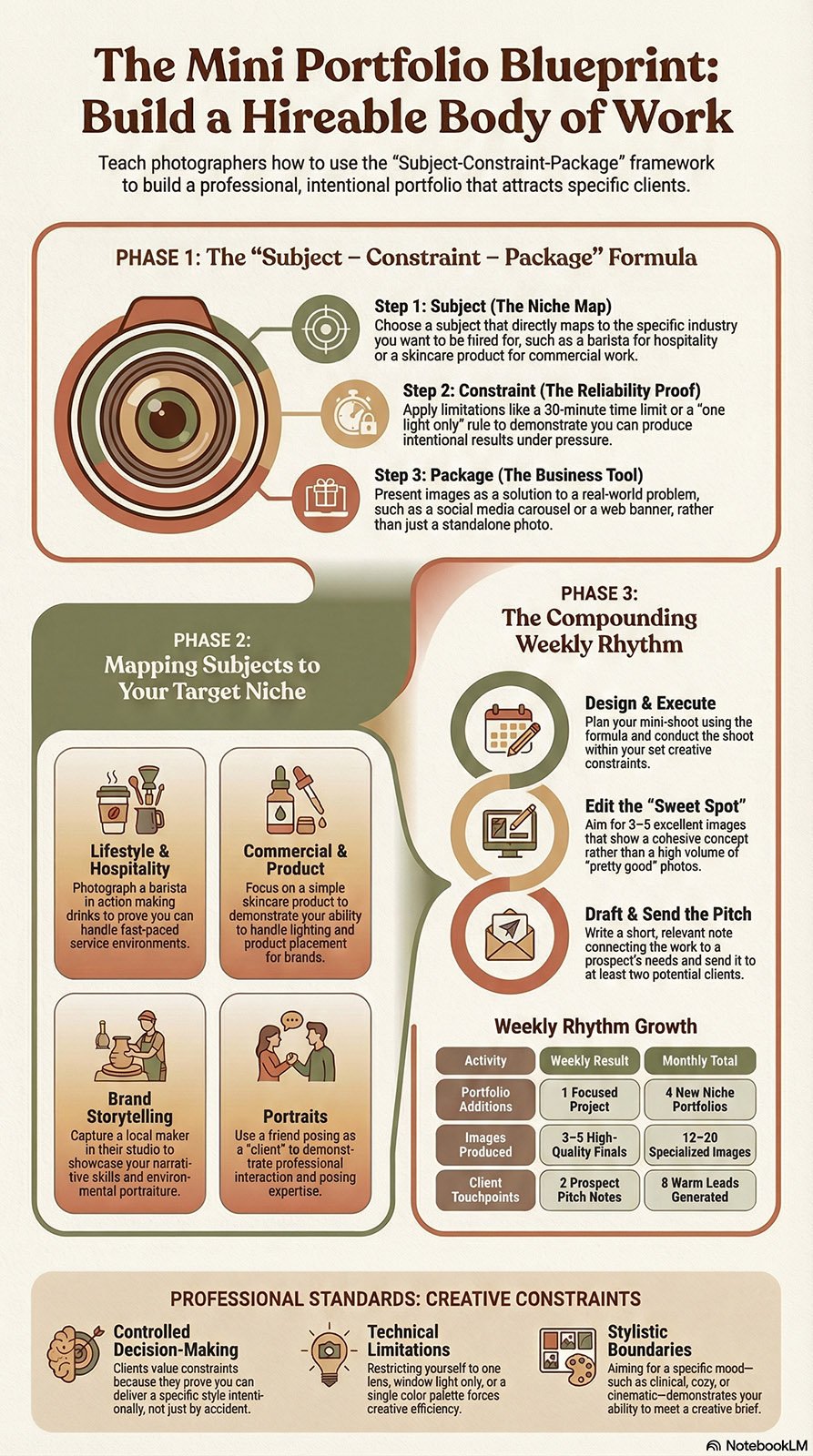
The formula: Subject → Constraint → Package
The document’s most useful framework is Subject → Constraint → Package, which keeps mini-shoots from turning into unfocused “content days.”
1) Subject (what you’re photographing)
Choose something that directly maps to a niche you want to be hired in: a barista making drinks (lifestyle + hospitality), a simple skincare product (commercial), a local maker in their studio (brand storytelling), or a friend as a “client” (portraits).
2) Constraint (the creative challenge)
Constraints make shoots efficient and portfolio-ready. Examples include: one light only, window light only, one color palette, 30 minutes total, one lens, or a specific mood (clinical, cozy, cinematic). The constraint forces you to make decisions—and clients love seeing controlled decision-making.
3) Package (how you’d deliver it to a client)
This is where mini-shoots become powerful. Don’t just “post a photo.” Package the results like a real assignment: what problem does this solve, what images would the client get, and how would they use them (web banners, product page, social carousel, campaign announcement)? This turns your portfolio into a business tool.
Keep it tight: 3–5 excellent images beat 30 “pretty good” ones
Mini-shoots aren’t about volume—they’re about clarity. The chapter’s weekly plan points to executing the shoot and editing 3–5 strong images, which is the sweet spot for showing a cohesive concept without padding. Those few images can become a portfolio series, a targeted email attachment, or a pitch-ready PDF page. Turn images into opportunities: send a pitch note
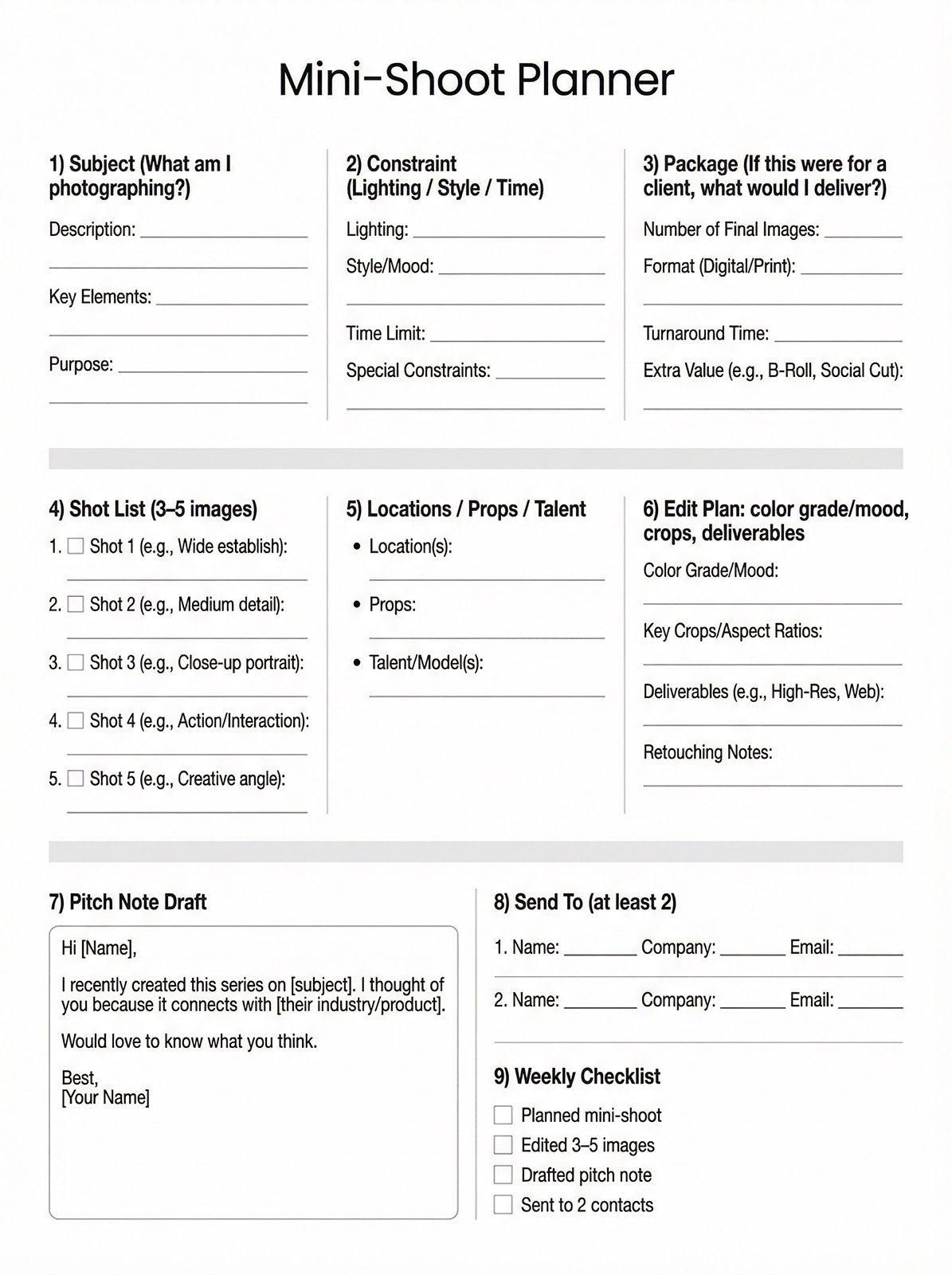
A mini-shoot becomes exponentially more valuable when you share it directly with people who might hire you. The workbook includes a simple pitch-note template you can adapt: “Hi [Name], I recently created this series on [subject]… it connects with [their industry/product]… would love to know what you think.” Short, relevant, and low-pressure beats a long sales email every time.
A simple weekly rhythm that compounds
To make this sustainable, follow the document’s checklist-like approach: design one mini-shoot, execute it, edit a small set of final images, draft the pitch note, and send it to at least two prospects. Over a month, that’s four focused portfolio additions and eight warm touchpoints—built deliberately toward the clients you actually want.
30-Day Portfolio Mini-Shoot Challenge Calendar (Themes + Weekly Constraints)
Build this around the Subject → Constraint → Package method so every mini-shoot results in a tight, client-relevant set of 3–5 finished images plus a simple pitch-ready concept. Source
Weekly constraint rules (apply all 7 days of each week)
Week 1: Light discipline (choose one light approach per day: window, shade, lamp, flash, etc.)
Week 2: Color discipline (each day has a limited palette)
Week 3: Story discipline (every set must show a beginning–middle–end)
Week 4: Client discipline (every shoot is packaged for a specific industry + use case)
Week 1 — Light Discipline (Days 1–7)
Day 1: “Window Light Portrait” — Constraint: window light only, no reflector
Day 2: “Hard Light Still Life” — Constraint: direct sun/hard shadow shapes
Day 3: “Night Street Scene” — Constraint: only available street/neon light
Day 4: “One Lamp Editorial” — Constraint: single household lamp, warm WB
Day 5: “Backlit Product” — Constraint: backlight only + rim highlight required
Day 6: “Open Shade Lifestyle” — Constraint: open shade only, no mixed light
Day 7: “Flash Bounce Basics” — Constraint: on-camera flash bounced (wall/ceiling)
Deliverable each day: 3–5 images edited consistently. Source
Week 2 — Color Discipline (Days 8–14)
Day 8: “All White Minimal” — Constraint: whites/neutral tones only
Day 9: “Monochrome Red” — Constraint: red is the hero color in every frame
Day 10: “Blue Hour Mood” — Constraint: cool palette only, no warm highlights
Day 11: “Earth Tones Brand” — Constraint: tan/brown/olive palette
Day 12: “Black + Metallic” — Constraint: black background + one metallic accent
Day 13: “Pastel Soft Story” — Constraint: pastel palette + low contrast edit
Day 14: “Two-Color Limit” — Constraint: only two colors visible (plus neutrals)
Packaging prompt: write one sentence describing where these images would live (homepage banner, product page, social carousel, etc.). Source
Week 3 — Story Discipline (Days 15–21)
Day 15: “Morning Routine” — Constraint: 5-shot sequence (wake → coffee → out the door)
Day 16: “Maker at Work” — Constraint: show hands, tools, and final product
Day 17: “Behind-the-Scenes Mini” — Constraint: include 1 wide, 1 medium, 1 detail
Day 18: “Before / During / After” — Constraint: triptych storytelling format
Day 19: “A Service Being Delivered” — Constraint: client POV + provider POV
Day 20: “A Place With Personality” — Constraint: establish → detail → human moment
Day 21: “One Object, Three Meanings” — Constraint: change context to alter story
Edit rule: keep one consistent crop ratio for the whole set (e.g., all 4:5 or all 3:2).
Week 4 — Client Discipline (Days 22–30)
Each day: pick a real local business (or dream brand) and package the shoot as if for them.
Day 22: “Coffee Shop Social Pack” — Constraint: 5 images for Instagram grid cohesion
Day 23: “Skincare E-comm” — Constraint: clean background + label readable in 2 shots
Day 24: “Restaurant Menu Story” — Constraint: 3 dishes + 2 ambience images
Day 25: “Fitness Coach Promo” — Constraint: action + testimonial-style portrait
Day 26: “Real Estate Feature” — Constraint: 10-minute shoot, must include 1 hero room
Day 27: “Salon / Barber Branding” — Constraint: mirror shot included, no clutter
Day 28: “Artist Press Kit” — Constraint: 1 portrait + 1 studio wide + 3 detail shots
Day 29: “Nonprofit Impact” — Constraint: convey mission without logos/text overlays
Day 30: “Your Niche Signature Shoot” — Constraint: repeat the style you want hired for