
It’s time to get serious about ai.
Build Your Own AI Bidding Tool and Landing Page in 1 Weekend
PART THREE
Get a copy of Visual Studio Code and install it.
This will be your most powerful tool for working with your site.
Can I Edit Without Code?
GreenLight Visual Editor
GreenLight is a visual editor for Markdown and HTML files that works in VS Code and compatible IDEs.
To install:
- In VS Code, select View > Extensions
- Search for “GreenLight” in the marketplace
- Click Install on the GreenLight extension
After installation, right-click any .html, .astro, .md, or .mdx file and
choose “Open with GreenLight Visual Editor”.
We will do this together in class.
A Design Lexicon
If you get interested in design, you may want to understand the terms of design.
CREATING A LANDING PAGE YOU CAN MODIFY
What is a Landing Page and why should we use one?
Control over first impressions
A portfolio site shows everything. A landing page shows exactly what you want a specific visitor to see. A product photographer targeting luxury clients in Scottsdale can build a page that speaks only to that audience, with pricing language, imagery, and tone calibrated for them. Social media forces you into a feed. A landing page is a room you designed.
SEO structure
Search engines rank pages, not entire websites. A landing page built around “food photographer Queen Creek” will outperform a general portfolio page titled “My Work” every time. The headline, image alt text, meta description, and page copy can all point at one specific search phrase. Photographers who serve multiple niches can build separate pages for each: one for food, one for product, one for prints for sale. Each page targets different search terms without diluting the others.
Niche visibility
This connects to SEO but goes beyond it. A page dedicated to a single niche, say boudoir photography or equestrian portraits, signals to the visitor immediately that this photographer knows that world. Generic portfolio sites make people wonder. A focused page answers the question “is this person right for me” in about four seconds.
A single call to action
Most photographer websites have navigation menus with six options. Landing pages remove that friction. The visitor reads, looks at images, and hits one button: book a consultation, get a price list, or schedule a call. Fewer decisions mean more conversions.
Client testimonials in context
A testimonial from a baker means more on a food page than buried in a generic reviews section. Landing pages let photographers place social proof exactly where doubt tends to appear, usually right before the call to action.
Running ads efficiently
If a photographer runs a Facebook or Google ad, the landing page is where that ad sends traffic. A dedicated page built to match the ad’s message converts far better than sending someone to a homepage. This matters the moment a photographer starts spending money on promotion.
Seasonal or promotional offers
Mini sessions, holiday portraits, back-to-school headshots. These have a short window and don’t belong permanently in a portfolio. A landing page can go up in October and come down in November. It’s a campaign tool, not just a permanent presence.
Analytics that mean something
A landing page gives you one clear metric: did the visitor take the action or not. On a portfolio site with multiple pages and no clear goal, traffic data is hard to interpret. Landing page data tells you whether your offer, your imagery, or your copy needs work.
Start here:
If you wanted to rebuild this page next month with different images but the same look, what would you need to write down?
Your Brand
You would want the same colors, fonts, style, and look and feel so the different pages would align with your brand.
This is where the .md file comes in.
But the .md file from Claude Design will likely be verbose and reference specific design choices tied to that one image. We will have Claude simplify it and “extract the design DNA” rather than just shortening it.
You should end up with something that describes proportions, color relationships, typography hierarchy, and spacing logic, not specific colors or fonts from the original. That way the prompt works regardless of what images you bring next time.
How do we design the page so we can do some modifications to it without having to go back to Claude and rebuild it. Of course, that is an option, but we sometimes like more control.
Site Structure
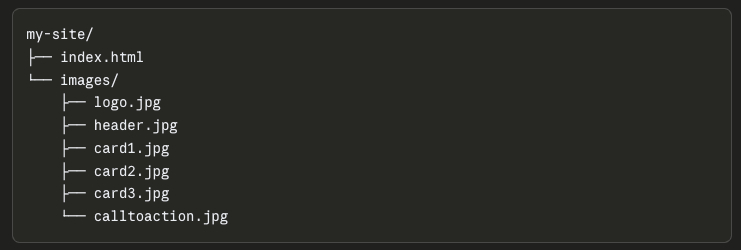
We build it with easy to control components. In this landing page setup, we have the page (index.html) and the imagery separate. The page calls the image: card1.jpg. If we want to change the image, we simply create a new image named card1.jpg and upload it. Image changed.
How do we find a design we like if we are not designers?
Design Inspiration
I use several ways:
Search for websites you like by genre. Use Google.
Search with Perplexity: What are the coolest trends in landing page design?”
I love cosmos.so for inspiration on design and photography.
Landingfolio.com and Designspiration are also good places for ideas.
What do we do when we find a design we like?
How Do I Get A Design File (.md)?
Make a screenshot and upload it to Claude and ask it to produce a design specification in markdown. A prompt like:
“Analyze this page design and write a markdown file that describes the layout structure, color relationships, typography hierarchy, spacing approach, and visual hierarchy. Focus on the design system, not the specific content.”
You’ll get back something detailed.
Examine it and see what it has.
Ask yourself: “What in here would change if I used different images?
What would stay the same?”
This distinction is the basis for decisions you must make.
The .md file I got was huge? What do I do with it?
How Do I Simplify The Design Brief?
Paste the verbose .md back into Claude and ask:
“Simplify this into a concise design brief I can reuse. It should describe the layout sections, the visual hierarchy, the color approach (warm/cool/neutral, not hex codes), and the typography weight relationships. Remove anything specific to the original content. Keep it under 30 lines.”
What you end up with should be portable.
Test it by asking Claude to build a landing page using only the brief and the image folder structure, without the original screenshot. If the design feels like the same family, the brief worked.
NOTE: We do have to upload the images before we do this.
Now I have the Design Brief, and the images, what do I do now?
Now Can I Build My Page?
Now you have a content brief, a design brief, and your images,
Have them prompt Claude to generate the HTML:
“Build a single HTML file for a landing page. Use this design brief: [paste brief]. Reference images at these paths: images/logo.jpg, images/header.jpg, images/card1.jpg, images/card2.jpg, images/card3.jpg, images/calltoaction.jpg. The page should have a header section, three cards in a row, and a call-to-action section. All CSS should be inside the HTML file. Use the content we have created that coincides with the design brief.
Header Copy
Body Copy
Card one copy
Card two copy
Card three copy
Call to action copy
Add interesting transformations and elegant animations (like framer) where appropriate.
Each image has a partner.
Each section has both a visual and words.
When you hand Claude the full prompt, you’re handing it a complete package: structure from the design brief, visuals from the image paths, and words from the copy blocks.
The prompt they end up writing becomes almost formulaic in a good way:
“Build a single HTML landing page using this design brief: [brief]. Use these image paths: [paths]. Use this copy: ©.”
That repeatability is important. Once you’ve done it, the process for the next client or the next niche is just swapping the three inputs. Same prompt structure, different brief, different images, different copy.
AI as a workflow tool rather than a one-time trick.
This is real power.