
Module Four: Positioning And Outreach
Image Upload:
|
Upload files
|
|
|
|
|
|
|



|
|
Image Size: 1200 pixels on long side
IMPORTANT: IMAGE FILE NAME
SH-first-last-module-#
(Like this: SH-don-giannatti-module-1)
Course Details
Module Four
Getting Your Name Out
The Assignment
Before next class:
- Finalize your positioning statement.
- Build a list of 25 prospects.
- Send 5 outreach emails.
Meeting Notes
Quick recap
The meeting focused on photography business development and technical skills, with Don guiding participants through website creation using Adobe Portfolio and discussing pricing strategies. Don demonstrated advanced Photoshop editing techniques, including color grading and film emulation, using a lemon cake photograph as an example. The group reviewed various website building platforms including Format, Squarespace, and Wix, with Don emphasizing the importance of establishing a consistent visual style through color grading. Participants shared their own website progress and discussed strategies for contacting potential clients, with Don encouraging them to send 2-3 emails per day. The session concluded with a review of proper pricing approaches and the announcement of an upcoming follow-up class 30 days after the final class on April 11th.
Next steps
- All participants: Create a series or set of product photos (as described in class) and add them to your website before the next meeting
- All participants: Send out 2-3 client outreach emails this week
- All participants: Complete website with series/set before next week’s meeting
- Don: Schedule follow-up class 30 days after last class (to be scheduled during last class)
- Becky: Add photo of herself or work environment to About page on her website
- Scott: Visit Verizon store regarding lost phone
- All participants: Review Module 6 materials before next meeting (note: no meeting on 21st, next meeting on 28th)
Summary
Pricing Strategy and Training Update
Don discussed the importance of having a rate card to avoid awkward situations when asked about pricing. He introduced bonus materials, including a comprehensive guide on pricing and email strategies, emphasizing that even sending two emails per day can be beneficial. Don also announced that the next meeting would be on March 28th, skipping March 21st, and assigned a task for participants to secure a photography job, even if it’s free, as part of their training.
Email Strategy and Class Updates
Don confirmed there will be no meeting on the 21st and the last class will be on April 4th, followed by a follow-up class 30 days later. The group discussed strategies for finding contact emails, with Don recommending LinkedIn, AI tools like Claude, and direct calls, while warning against using generic contact forms which he estimates are only effective 30% of the time. Don shared a free AI tool called Bagelbots that provides daily email prompts and examples, and advised keeping DMs under 25-30 words with a personal complement to avoid appearing like spam.
Website Security and Photography Tips
The group discussed website security measures, with Don recommending human verification tools for contact forms and suggesting the use of Google Voice or secondary phone lines for business communications. They reviewed photography techniques, with Don providing feedback on lighting and composition, particularly for product shots. Becky shared her experience using AI tools to create photo variations, which Don encouraged her to include in her portfolio without mentioning AI, as the aesthetic quality remains the client’s focus. Don also noted the emerging trend of 16×9 aspect ratios in photography and emphasized the importance of color grading in post-processing.
Photography Techniques and AI Tools
Don discussed the differences between sets and series in photography, explaining how sets focus on a single item with multiple angles while series showcase related items telling a story. He introduced Notebook LM, a new AI tool with 12 styles for creating infographics and explainer videos. Don emphasized the importance of creating a one-client landing page with 20-25 images, combining series, sets, and hero shots, and encouraged participants to use Adobe Portfolio to build their websites. Debra shared her experience building a website using Adobe Portfolio, highlighting challenges with aligning horizontal and vertical images, while Don advised on maintaining consistent image sizes for uniform display.
Website Platform Features and Options
Don presented various website building platforms to the group, including Squarespace, Wix, and Adobe, discussing their features, pricing, and templates. He highlighted Squarespace’s design capabilities and Wix’s advanced animation features, while noting that Google offers free website creation with built-in SEO. Debra expressed interest in potentially transitioning her website to Squarespace, and Don advised her to do so if she was unsatisfied with her current setup. The group also explored the use of client galleries and discussed the potential of using these platforms for showcasing and selling artwork.
Photographer Portfolio Website Review
The group reviewed several photographers’ portfolio websites, with Don providing feedback on layout and content organization. Debra and Becky received guidance on adding text boxes, hero shots, and back buttons to their websites, while Don emphasized the importance of showing both portfolio work and completed projects. The discussion concluded with Don encouraging the photographers to create more product photography, particularly of packaged goods, to demonstrate their capabilities to potential clients.
Strategies for Effective Product Promotion
Don and Scott discussed strategies for showcasing and promoting work through various platforms, including websites and social media. Scott proposed visiting local farmers’ markets to photograph and print products, which Don approved, emphasizing the importance of engaging with vendors and recognizing interested questions as opportunities to sell. Don also provided a detailed tutorial on using Photoshop and Camera Raw to enhance images, focusing on adjusting exposure, contrast, and color to achieve desired effects. He stressed the importance of understanding the tools and making informed adjustments rather than relying on presets.
Advanced Photoshop Editing Techniques
Don demonstrated advanced photo editing techniques in Photoshop, showing how to adjust exposure, color grading, and masking to enhance an image of a cake. He explained various tools and settings, including the use of smart objects, radial and linear gradients, and lens corrections. Scott and beckystinehour watched and learned from the demonstration, with Scott expressing amazement at the techniques shown. Don also provided tips on handling specific challenges, such as dealing with blown-out highlights in white icing.
Film Emulation for Consistent Grading
Don demonstrated how to use film emulation presets in Lightroom and Photoshop to achieve consistent color grading across photos, particularly for landscape shots. He explained that these presets help establish a unique look for images and can be adjusted as needed. The group discussed the importance of color grading and how it applies to different types of photography, such as product shots which require a more neutral approach. Don also shared his concerns about the declining water levels in Lake Powell and the potential impact on the region’s ecosystem and electricity supply.
Meeting Notes
Quick recap
Mildred and Frank discussed their confusion about the timing of a photography class, realizing they were both early to the session scheduled for 3:30 PM Pacific time. They shared their backgrounds – Mildred is a professional wedding and portrait photographer transitioning to commercial work, while Frank is a retired city planner who takes photos as a hobby. Both participants acknowledged being overwhelmed by the comprehensive material presented in the class, with Frank being a week behind in the coursework. They clarified the time zone differences between their locations and agreed to return for the actual class start time of 6:30 PM Eastern time.
Next steps
Next steps were not generated due to insufficient transcript.
Summary
Class Website Access Issues
Mildr and Franklinquon discussed technical difficulties accessing a class website, including password issues and time zone confusion. They discovered that Franklinquon was in California on Pacific Time, while Mildr was in South Carolina on Eastern Time. Despite their shared struggles with the platform, they were able to resolve the password problem with help from another participant named Don.
Photography Backgrounds and Payment Methods
Mildred and Franklinquon discussed their backgrounds in photography, with Mildred being a professional wedding and portrait photographer transitioning to commercial photography, while Franklinquon is a retired city planner who takes photos as a hobby. They shared their experiences with photography and payment methods, with Mildred suggesting that bartering can be considered a form of payment.
Egg Value and Pet Discussion
Franklin and Mildr discussed the value of eggs, with Mildr explaining that each egg is worth $150, which equals the $500 payment Franklin mentioned. They briefly talked about their pets, with Franklin mentioning his American Eskimo and German Shepherd, and Mildr sharing about his boxer. The conversation was informal and casual, focusing on personal topics rather than any specific decisions or action items.
Side Hustle Class Discussion
Mildr joined the class late last week due to a mentorship commitment and missed the first part of the session. Franklinquon expressed that the side hustle class was more intensive than anticipated, with comprehensive material to review. Both agreed that the depth of information was beneficial, as it provided more detailed insights than basic resources.
Learning Experience Discussion
Mildr and Franklinquon discussed their learning experience in a class, acknowledging the vast amount of information and the challenge of keeping up. Mildr emphasized the value of having more information, even if it means being a week behind, as it allows for better understanding and learning. They both agreed that the class, taught by a former photographer and art director, offers valuable insights and knowledge.
Time Zone Class Scheduling Discussion
Franklin and Mildred discussed the timing of a class scheduled for 3:30 PM Pacific Time, which they realized was 6:30 PM for Mildred due to the time zone difference. They agreed to return at 6:30 PM to join the class, confirming the correct meeting time.
Special March 1, 2026 Meeting.
(Because of page failures on Saturday.)
Positioning & Outreach
Turning Clarity Into Conversations
Up to now, everything has been preparation.
Lane.
Portfolio direction.
Commercial mindset.
Now we turn it outward.
This is where most photographers go a little wobbly.
It has nothing to do with alented.
It’s because outreach feels exposed, and that can feel scary.
There are a lot of small businesses out there, and they’re looking for help.
And if you can clearly communicate how you help them, you’re already ahead of 90% of photographers.
This week isn’t about getting a job.
It’s about building a system that leads to jobs.
PART ONE
Positioning: Say What You Do Without Rambling
You are not a “photographer.”
You are a problem-solver with a camera.
If you say:
“I’m a commercial photographer specializing in visual storytelling…”
You’ve lost them.
If you say:
“I create clean product photos for local skincare brands so they look premium online.”
Now we’re talking.
Clarity builds confidence — in them and in you.
The Formula
“I create [specific type of imagery] for [specific type of business] so they can [specific result].”
Examples:
-
“I photograph updated menu items for independent restaurants so their online ordering looks as good as their food tastes.”
-
“I create simple, bold product photography for boutique brands so they stand out on Shopify and Instagram.”
-
“I shoot clean brand imagery for local makers so they can look established and trustworthy.”
Not dramatic.
Not poetic.
Clear.
What We’re Avoiding
- “I love capturing moments.”
- “I’m passionate about storytelling.”
- “I help brands elevate their visual voice.”
Those sound nice.
They convert poorly.
PART TWO
Who You Are Actually Targeting
This is where momentum builds.
You are not chasing Nike.
You are not pitching national agencies.
You are looking for:
-
Independent restaurants
-
Boutique retailers
-
Small product brands
-
Local skincare makers
-
Shopify stores with weak images
-
Businesses with inconsistent visuals
The businesses that:
-
Don’t have an in-house photographer
-
Can’t justify a $10k shoot
-
But absolutely benefit from better imagery
You are not hunting whales.
You are building relationships.
PART THREE
Building the Prospect List (The System)
This is where we shift from emotion to process.
Open Google Maps.
Search:
-
“Boutique near me”
-
“Farm to table restaurant”
-
“Local skincare brand”
-
“Handmade jewelry shop”
Click through.
Look at:
-
Website quality
-
Product images
-
Menu photos
-
Social consistency
You are looking for:
-
Good business
-
Weak imagery
That’s opportunity.
Your first goal:
25 prospects.
Stretch goal:
Not to email today.
To build your pipeline.
Momentum comes from having names on paper.
PART FOUR
Outreach: Keep It Human
Outreach does not need to be clever.
It needs to be specific.
Structure:
Quick acknowledgment
- Specific observation
- Clear offer
- Simple next step
Example:
Hi Sarah,
I came across your site while looking at local skincare brands. I really like your clean packaging — especially the charcoal mask line.
I noticed some of the product photos vary in lighting and background. I specialize in clean, consistent product photography for brands like yours and thought it might be helpful.
Would you be open to a quick conversation next week?
Short.
No attachments.
No 900-word bio.
No begging.
The Follow-Up Reality
Most responses come after the second or third touch.
If you send one email and retreat, that’s not outreach. That’s hope.
Follow-up rule:
-
5–7 days: gentle nudge
-
10–14 days: add value (idea, suggestion, insight)
Professional persistence.
Not pressure.
PART FIVE
Build Your Outreach System
This is the most important section.
You are not “trying outreach.”
You are building a repeatable rhythm.
Example Weekly System:
-
Monday: Research 5 new prospects
-
Tuesday: Send 3 emails
-
Wednesday: Engage on social with 3 businesses
-
Thursday: Follow up on prior contacts
-
Friday: Track and review
This is not aggressive.
This is consistent.
And consistency wins.
PART SIX
The Assignment
Before next class:
- Finalize your positioning statement.
- Build a list of 25 prospects.
- Send 5 outreach emails.
- Track everything.
You may feel resistance.
That’s normal.
You are not spamming strangers.
You are offering a solution.
And here’s something most photographers never realize:
Small businesses are often relieved when someone competent reaches out.
Here’s the guarantee!
If you don’t send the email, nothing happens.
If you send 5, something happens.
Maybe not a job immediately.
But awareness.
Recognition.
A seed planted.
And this business is built on seeds.
You already have the skills.
Now you build the habit.
Initial Contact Email
(Short. Direct. Observant.)
Subject Line Options:
- Quick note about your product photos
- Idea for your online imagery
- Local photographer — quick thought
- Noticed your new menu launch
Template A – Product Brand
Hi [Name],
I came across your brand while looking at local [skincare / boutique / product] companies. I really like the simplicity of your packaging, especially the [specific product].
I noticed some of the product images vary in lighting and background. I specialize in clean, consistent product photography for small brands and thought it might be helpful to connect.
Would you be open to a quick conversation next week?
Best,
[Your Name]
Template B – Restaurant
Hi [Name],
I saw your recent post about the [specific dish] and it looks great.
I took a quick look at your online menu and noticed some of the images don’t quite match how strong your food looks on social. I photograph updated menu items for independent restaurants and help keep visuals consistent across web and delivery apps.
If you’re open to it, I’d be happy to chat briefly about how that might work for you.
[Your Name]
Why this works:
-
Specific observation
-
No attachments
-
No résumé
-
Clear next step
Follow-Up Email
(5–7 Days Later)
Keep it shorter than the first one.
Hi [Name],
Just wanted to circle back on my note from last week.
If updating your imagery is on the radar this season, I’d be happy to talk through a simple plan. If not, no worries at all.
Appreciate your time,
[Your Name]
Clean. Calm. No desperation.
Value-Add / Idea Email
(Second Follow-Up – Adds Insight)
This one gives something.
Hi [Name],
One quick thought I had after looking again at your site — a simple series of consistent white-background product shots could really strengthen your Shopify pages and make the collection feel more unified.
If that’s helpful, I’d be glad to sketch out what that could look like.
Either way, wishing you a strong season.
Best,
[Your Name]
Or for restaurant:
Hi [Name],
I noticed you’re promoting your new seasonal menu. A small batch of updated hero images — even 4–5 key dishes — could give you strong content for web, delivery platforms, and social for months.
If you’d like, I can outline what a focused shoot like that might look like.
[Your Name]
Tone Rules
Important:
-
Under 150 words.
-
One idea per email.
-
No attachment unless asked.
-
No giant portfolio dump.
-
Always specific.
What to Avoid
Don’t write:
-
“I am passionate about visual storytelling.”
-
“I have 10 years of experience.”
-
“Please find attached my full portfolio.”
No one asked.
Lead with their business, not your ego.
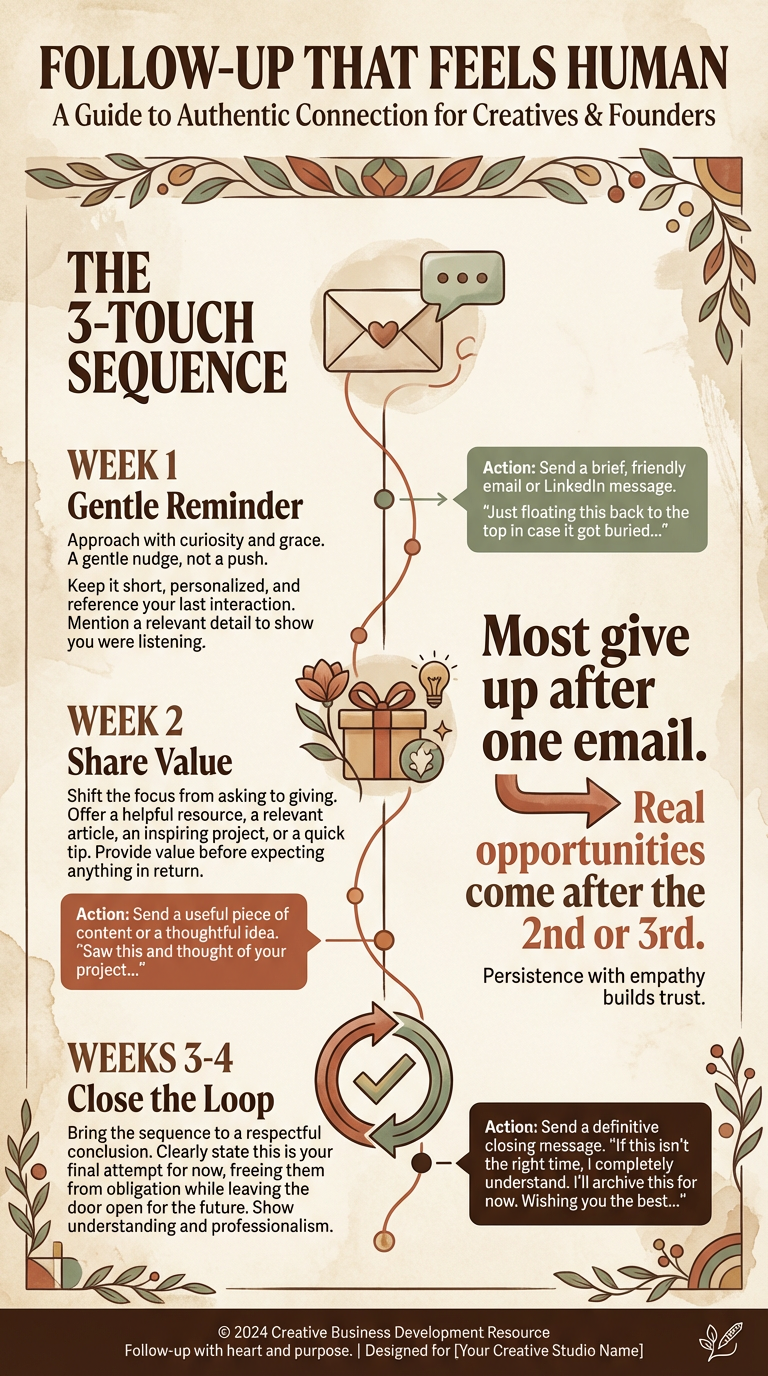
Suggested Three Touch Sequence
After sending your initial email, think about this sequence to help you connect with your target.
- A reminder of who you are (add a photo).
- Added value: an idea for them, or a shot of their product to use for social.
- Close the Loop: Give them a reason to do some work with you.
RESPONDING TO OBJECTIONS
Stay Calm.
Protect the Position.
Move the Conversation Forward.
The Rule
Never respond to objections emotionally.
Draft. Pause. Review. Then send.
If you respond immediately, you will:
- Discount too quickly
- Over-explain
- Sound unsure
- Apologize for your number
Professionals don’t react.
They respond.
The 5 Most Common Objections
(And How to Handle Them)
1️⃣ “That’s more than we expected.”
What it means:
They’re managing budget. Not attacking you.
What not to do:
- “Oh, I can lower it.”
- “I’m sorry if that seems high.”
Steady response principle:
Protect the rate. Adjust scope.
Example:
I understand budgets can be tight.
We could scale this to 3 images instead of 6 and keep it closer to your range while maintaining quality. Would that be helpful?
2️⃣ “We don’t have budget right now.”
What it means:
Timing issue, or uncertainty.
What not to do:
- Chase.
- Push harder.
Steady response principle:
Keep the door open.
Example:
Understood.
If imagery becomes a priority later this season, I’d be happy to reconnect.
Wishing you a strong quarter.
Calm. Professional. Memorable.
3️⃣ “Can you do it for less?”
What it means:
They’re testing flexibility.
What not to do:
Lower the rate immediately.
Steady response principle:
Reduce deliverables, not value.
Example:
I wouldn’t be able to reduce the rate, but we could simplify the scope to fit your budget.
For example, focusing on your top 3 products instead of the full line.
Scope shifts.
Positioning stays intact.
4️⃣ “We already have someone.”
What it means:
They have a relationship. That’s normal.
What not to do:
Compete aggressively.
Steady response principle:
Stay available.
Example:
That makes sense.
If you ever need additional support or a different style for a campaign, I’d be happy to reconnect.
You’re planting a seed.
5️⃣ “We just need a few quick shots.”
What it means:
They think photography is simple.
What not to do:
Roll your eyes.
Educate them aggressively.
Use potty mouth language… heh.
Steady response principle:
Clarify expectations.
Example:
I can definitely keep it efficient.
Even a small shoot benefits from proper lighting and planning so it represents your brand well.
I’d be happy to outline a focused option for you.
That’s guiding, not correcting.
The Confidence Checklist
Before You Hit Send
- Did I protect my minimum price floor?
- Did I avoid apologizing?
- Did I avoid over-explaining?
- Did I offer a solution instead of a discount?
- Do I sound calm?
If yes → Send.
The Mindset Shift
Objections are not rejection.
They are part of the process.
Most small businesses are cautious — not hostile.
When you respond steadily, you signal:
- Experience
- Stability
- Confidence
And that builds trust, your most important asset.