Follow Up and
Workflow Strategies

Upload
|
Upload files
|
|
|
|
|
|
|



|
|
Image Size: 1200 pixels on long side
IMPORTANT: IMAGE FILE NAME
SH-first-last-module-#
(Like this: SH-don-giannatti-module-1)
A PHOTO EDITOR:
INSTAGRAM
PERSONAL PROJECTS
PROMOTIONAL MATERIALS
DOWNLOAD GOOGLE SHEET OR EXCEL FILE FOR CRM
ClientPipeline_CRM.xlsx
ZIPPED FILE
A Weekly Planner PDF
The Weekly Scheduler
Weekly System At A Glance
Weekly System at a Glance
The Follow-Up Playbook
Follow-Up Playbook PDF
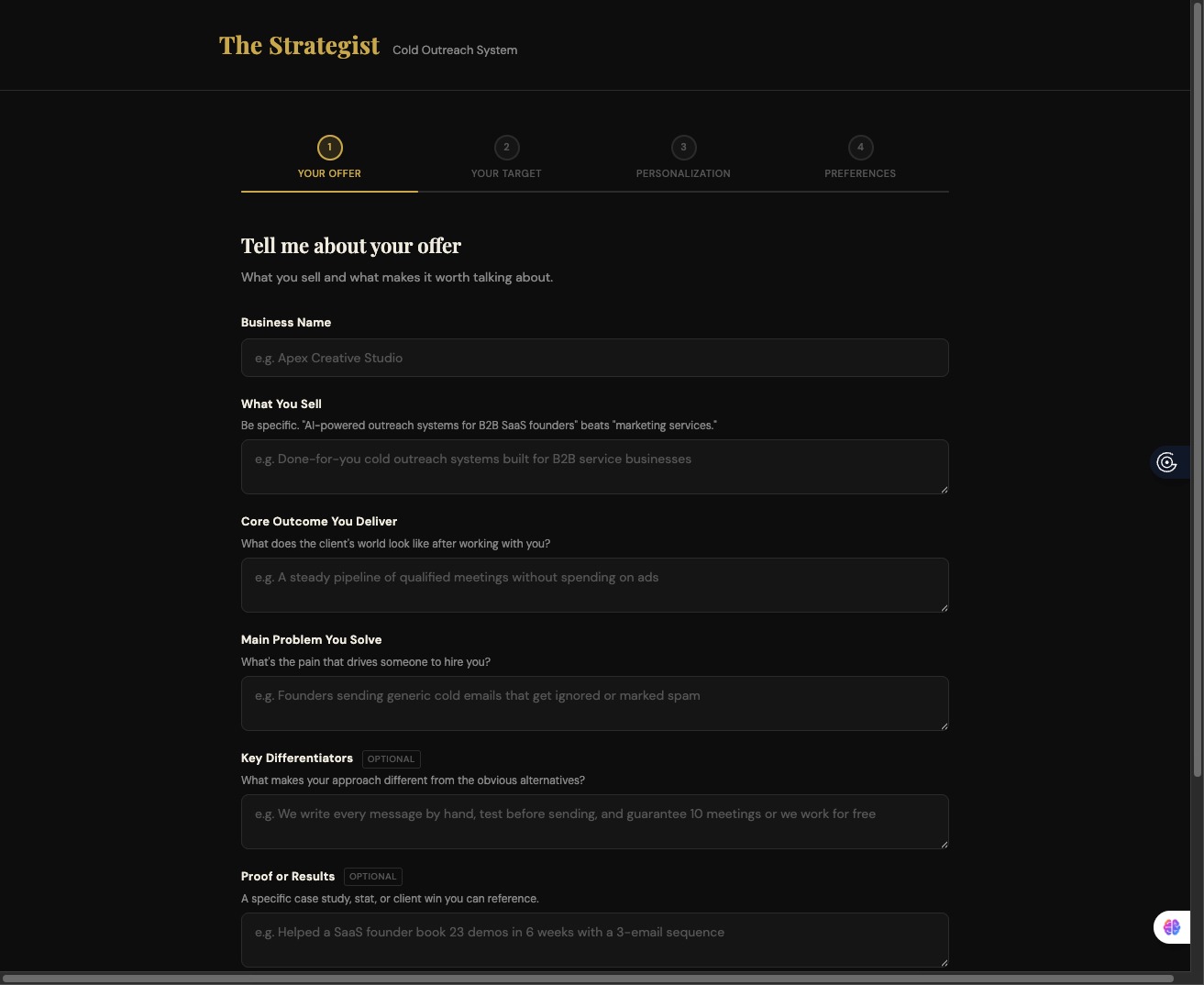
The Strategist:
Create your emails here.
(For one-on-one to an identifiable entity.)
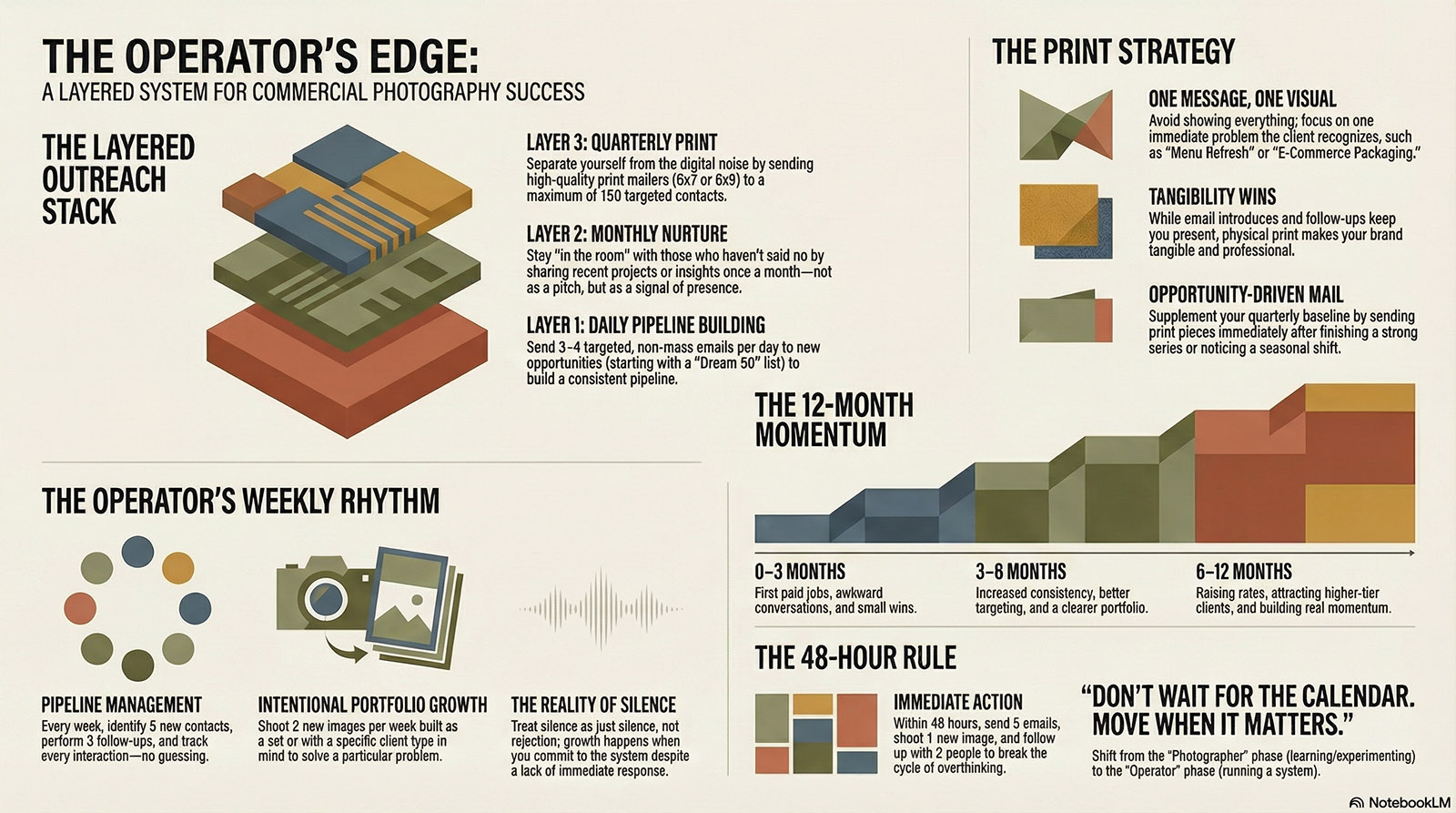
The Layered Outreach
Direct Mail & Layered Outreach
There is no single marketing tactic that works.
There is only consistent visibility over time.
That’s it.
Most photographers try to be seen once and hope it lands.
It doesn’t.
Because clients don’t hire when you show up.
They hire when timing and familiarity collide.
This is how you create that collision.
The Layered System
This isn’t email vs print vs social.
It’s a stack.
Each layer does a different job.
Layer 1 — Daily Contact (New Opportunities)
- 3–4 emails per day
- Targeted, not mass
- Start with the Dream 50, then expand
This is your pipeline builder.
This is where new work comes from.
Not your website.
Not your Instagram.
This.
But let’s be honest:
Three strong emails beat ten forgettable ones.
If they feel generic, they are.
Layer 2 — Monthly Nurture (Stay in the Room)
These are the people who didn’t say yes… but didn’t say no.
Perfect.
Once a month, you send something simple:
- A recent project
- A short insight
- A useful idea
- A quick before/after
- A “here’s what I’m seeing right now” note
Not a pitch.
Not a brochure.
Just a signal that you’re working, paying attention, and still here.
This is how you stop starting from zero every time.
Layer 3 — Quarterly Print (Make It Real)
This is where you separate yourself.
Because almost no one does it anymore.
And that’s exactly why it works.
The Print Plan (Keep It Tight)
- Start with your Dream 50
- Expand to a max of 150 targeted contacts
- Print run: ~250 pieces
- Mailers
- Leave-behinds for in-person
Formats:
- 5×7 (clean, direct)
- 6×9 (a little more presence)
What Goes On It (This Matters More Than the Paper)
Most photographers blow this.
They try to show everything.
Don’t.
One idea.
One message.
One visual direction.
Examples:
- “Menu Refresh Season Is Coming”
- “Fast, Clean Product Photos for E-Commerce”
- “New Packaging? Let’s Make It Sell”
This is not about you.
This is about a problem they recognize immediately.
Calendar vs Opportunity (Do Both)
Quarterly is your baseline.
But the real leverage comes from this:
- Finished a strong series? → Send it
- Noticed a seasonal shift? → Send it
- Saw a client need? → Send it
Don’t wait for the calendar.
Move when it matters.
How It All Works Together
This is the part most people miss.
- Email introduces you
- Follow-up keeps you present
- Newsletter keeps you relevant
- Print makes you tangible
No single touch closes anything.
It’s the accumulation that wins.
The Resistance (You’ll Feel It)
You’ll think:
- “I don’t have enough work yet”
- “I don’t know what to send”
- “Print is expensive”
That’s not strategy.
That’s hesitation.
So shrink it.
- Send 25 pieces instead of 250
- Use one strong image
- Write one clear idea
But move.
The Real Advantage
This approach isn’t clever.
It’s not flashy.
It doesn’t feel exciting.
And that’s exactly why it works.
Because almost no one will stay consistent long enough to benefit from it.
Let’s not pretend that you need more…
You’ve got:
- A working portfolio
- A process
- Outreach tools
- A basic pipeline
That’s enough.
It’s not perfect.
It’s not polished.
But it is enough.
But it can also be uncomfortable.
See, up until now, you could hide behind learning. You could hide behind access, or system confusion. Or simply not knowing. (Did you ever notice how many times we use “I don’t know how,” when we really mean, “I don’t want to?”
Now?
If this doesn’t work… it’s on you.
That’s the all-too-common fear.
Not failure.
Ownership of failure.
And most of us will quietly step away right here.
The Truth We Hate To Hear
It’s easy to want it.
It’s easy to talk about it.
To plan it.
To organize it.
To tweak your website for the tenth time.
But doing the work, doing it consistently, while risking no response, no traction, no immediate reward?
That’s where the thining begins.
Let’s be clear:
It’s not a talent problem.
It’s not a gear problem.
It’s not even a market problem.
This is a behavior problem.
From Photographer to Operator
Up to now, you’ve been:
- Learning photography
- Building a portfolio
- Experimenting
That phase is over.
Now you are:
Running a small commercial photography business.
Even if it’s nights.
Even if it’s weekends.
Even if no one has paid you yet.
Believe me, identity shift matters.
Businesses don’t wait for motivation, their ‘muse’, or “the right time.”
They run systems.
The System – This Is What Saves You
More ideas are great. So are more images.
But what really pushes the work is a rhythm.
Every Week:
Pipeline
- 15 new contacts (at first, once momentum is achieved, that can be cut to 5)
- 3 follow-ups… minimum
- Track it (no guessing, no “I think I reached out”)
- CRM is your friend. Use it
Portfolio
- 2 new images
- Built as a set or with intention
- Shot for a specific client type
Thinking
- Who is this for?
- Where does it live?
- What problem does it solve?
That’s it, and it’s not complicated.
But it has to be non-negotiable.
The 30-Day Reality Window
Everything you’ve done in this course gets tested now.
Next 30 Days:
Week 1–2
- Reconnect with past contacts
- Clean up your portfolio (cut the weak work)
- Send new outreach
Week 3–4
- Pitch ideas (not “hire me”)
- Push for one small paid project
- Continue follow-ups
The Goal:
One paid job.
Not a dream client.
Not a huge budget.
Just proof that the system works.
Your First Job Isn’t Special
Let’s take the pressure off.
Your first paid job is not:
- Your breakthrough
- Your signature piece
- Your legacy
It’s your entry point.
Examples:
- 5 menu items for a café
- 10 product shots on white
- A social refresh for a small brand
Solve the problem.
Deliver clean work.
Be professional.
That’s it.
Where You Will Try to Quit
(And Be Sure, You Will Want to Quit)
Let me save you some time.
Here’s where people fall off:
- “I need a better portfolio first.”
- “They didn’t respond, so I guess they’re not interested.”
- “I’ll wait until things calm down.”
- “I should lower my price just to get something.”
- “I’ll start again next week.”
No.
That’s avoidance dressed up as strategy.
And this one matters:
Silence is not rejection.
It’s just silence.
The Real Problem You May Face is the Fear of Responsibility
And we all have a bit of this in us. The fact is:
If you don’t try, you can’t fail.
If you don’t push beyond your edges, you can always say:
“I could have done it.”
“The economy wasn’t good.”
“It was harder than I expected.”
That’s safe.
Comfortable.
Explainable.
But the moment you commit to the system:
- You send the emails
- You follow up
- You do the work
Now there’s nowhere to hide.
And we have to own the the result.
The Long Game (So You Don’t Panic)
Let’s stretch your timeline a bit.
0–3 Months
- First paid jobs
- Awkward conversations
- Small wins
3–6 Months
- More consistency
- Better targeting
- Clearer portfolio
6–12 Months
- Raise rates
- Better clients
- Real momentum
This is not overnight.
But it is absolutely predictable if you stay in motion.
The 48-Hour Rule (No Overthinking)
You don’t need another plan.
You need to move.
In the next 48 hours:
- Send 6 emails
- Shoot 1 new image
- Follow up with 2 people
- NO EXCEPTIONS
No perpetual polishing.
No ego hesitation.
Just action.
One Final Thought
This works.
I guarantee you, it works.
Not theoretically.
Not hypothetically.
It works if you work it.
THE FOLLOW UP PLAYBOOK
FOLLOW-UP PLAYBOOK
(We’ve talked about this several time, but here it is ONE LAST TIME.)
Most jobs don’t come from the first email.
They come from the second, third… sometimes the fourth.
But here’s what happens:
- Photographer sends one email
- Gets no response
- Moves on
And tells themselves:
“They’re not interested.”
No.
They’re busy.
They’re distracted.
They forgot you existed 10 minutes after opening your email.
The Rule
If you don’t follow up, you didn’t really reach out.
Let that land.
The Follow-Up Framework
Simple. Repeatable. No guesswork.
Touch 1 — Initial Email
(You’ve already covered this)
Touch 2 — Follow-Up #1 (3–5 Days Later)
Tone: Light, direct, no pressure
Structure:
- Quick check-in
- Reference original email
- Keep it short
Example:
Hey [Name],
Just wanted to bump this up in case it got buried.
Would love to connect if this is something you’re working on.
— Don
No pitch. No new info.
Just visibility.
Touch 3 — Follow-Up #2 (5–7 Days Later)
Now we add value.
Tone: Helpful, observant
Structure:
- Reference them specifically
- Offer an idea
Example:
Hey [Name],
I was looking through your menu/products and noticed a few spots where updated images could really help with consistency—especially for online ordering.
If it’s useful, I can put together a quick idea for you.
— Don
Now you’re not “checking in.”
You’re thinking.
Touch 4 — Follow-Up #3 (7–10 Days Later)
This is where most people quit.
You don’t.
Tone: Direct, respectful
Structure:
- Acknowledge no response
- Leave the door open
Example:
Hey [Name],
I haven’t heard back, so I’ll assume timing isn’t right.
I’ll circle back down the road—but if something comes up sooner, I’d love to help.
— Don
This does two things:
- Removes pressure
- Keeps the relationship intact
Touch 5 — Follow-Up #4 (30 Days Later)
Now you re-enter clean.
Tone: Fresh, relevant
Structure:
- New angle or update
- Short and clear
Example:
Hey [Name],
I just wrapped a small project similar to what you’re doing—thought of you.
If you’re updating anything this season, happy to share ideas.
— Don
You’re back without feeling repetitive.
The Cadence (Make It Visual)
- Day 1 — Initial Email
- Day 4 — Follow-Up 1
- Day 10 — Follow-Up 2
- Day 18 — Follow-Up 3
- Day 45 — Follow-Up 4
After that?
Move them into your monthly nurture list.
The Mindset (This Is Critical)
You are not:
- Begging
- Annoying
- Chasing
You are:
Staying visible long enough for timing to work in your favor.
That’s it.
What to Track (Non-Negotiable)
If they don’t track this, they won’t do it.
Minimum:
- Name
- Company
- Date of contact
- Follow-up stage
- Notes
No memory-based marketing.
Ever.
Common Mistakes (Call It Out)
- Writing long follow-ups (no one reads them)
- Changing tone too much (stay consistent)
- Giving up after one or two attempts
- Taking silence personally
- Sounding desperate on the third email
And this one:
Adding more words instead of more value.
The Quiet Advantage
Most photographers won’t do this.
Not because it’s hard…
But because it’s uncomfortable.
Which is exactly why it works.
Final Line
The first email introduces you.
The follow-up gets you hired.
Final Push
Look at your current outreach.
How many people have you already contacted…
…and never followed up with?
That’s not a lead problem.
That’s a follow-up problem.
Meeting Notes
Quick recap
This was a photography class session where Don provided guidance and feedback to students on their recent work and answered questions about pricing, client management, and technical techniques. The students shared their recent photography projects, including sports team photography, product shots, and AI-assisted images, with Don offering specific technical advice on lighting, composition, and post-processing. Don provided detailed pricing guidance for a tea product photography job, recommending a setup fee of $350 plus $10-12 per shot, and emphasized the importance of documenting setup details for future repetitions of similar jobs. The class also covered email marketing strategies, including the use of landing pages, domain emails, and proper image embedding in emails, with Don addressing students’ concerns about cybersecurity and client response rates.
Next steps
- Debra: Prepare and send quote for 25 product photos (tea boxes and tea bags) for the client, including setup fee and per-shot fee as discussed.
- Debra: Practice and set up sweep lighting and product shot setup before the tea product shoot, including testing both bright field and sweep methods.
- Debra: Document all setup details (lighting, distances, equipment, camera settings) for future reference and repeatability of the tea product shots.
- Franklinquon: Email the link to his updated portfolio to Don for sharing on Facebook.
- All participants: Review and use the provided pricing assessment tool (link to be shared in chat) to help determine pricing for upcoming jobs.
- All participants: Set up a MailerLite (or similar) account in preparation for next week’s class on email marketing/automation.
- All participants: Complete at least one portfolio-quality shoot for a client (paid or trade) before the class in two weeks, and be prepared to share success stories.
- Don: Share the pricing assessment tool link in the chat.
- Don: Conduct a class next week on email marketing/automation and leave-behinds.
- Don: Conduct a future class on advanced AI image prompting (as referenced in the meeting).
Summary
Progress Check-In Session Update
The meeting began with informal conversation among participants, including updates about technical issues and personal projects. Don then transitioned to the main agenda, clarifying that this was not Lesson 8 but rather a check-in session to assess progress and address any challenges. Don asked the group about any obstacles they were facing or jobs they had landed recently, encouraging participants to share updates and concerns. No specific decisions or action items were mentioned in the transcript provided.
Sports Photography Business Opportunities
Gizmo shared that he recently received opportunities to work with two sports leagues involving approximately 150 kids, which has delayed his work on other projects. He explained his pricing structure for sports photography, charging leagues for his time and services, with parents able to purchase photos separately, earning around $20-25 per child after expenses. The group briefly discussed technical issues with Don’s website where new content wasn’t displaying properly, and they noted the high quality of Don’s photography materials.
AI Image Generation Discussion
Franklin shared his experience using AI, specifically Claude and Firefly, to create a photo of a cake with detailed background elements. Don explained the technical aspects of using AI prompts and suggested exploring JSON prompts for more precise control over image generation. The discussion concluded with Don advising against reducing prices for AI-assisted work and offering to share Franklin’s portfolio link on Facebook.
AI Photography Project Techniques
The group discussed a photography project involving AI-generated images and their commercial applications. Don emphasized that using AI tools should not result in lower fees, comparing it to how industries don’t receive discounts when processes become more efficient. The team reviewed specific photography techniques, with Don providing feedback on improving an image of treats by adjusting contrast, cleaning up reflections, and perfecting the glass surface appearance. Don suggested using contrast adjustments in Lightroom rather than high-pass filters to maintain more natural depth and color in the image.
Photography Post-Processing Techniques Review
The group reviewed photography adjustments, with Don demonstrating how to fix black crush and color issues using curves adjustments in post-processing. William presented his tea product photography work, explaining his techniques for lighting and background manipulation using both physical setup and Photoshop tools like Firefly. The discussion concluded with Don mentioning upcoming topics about email clarity and pricing assessment for the class.
Pricing Assessment and Client Communication
Don shared a new pricing assessment tool that provides three tiered pricing options for different client types, including packages of 5, 10, or 20 shots. The group discussed a recent soap company project where Scott quoted $2,500 for 35 product shots but the client found the price too high. Don announced that next week’s topic will cover leave-behind materials, mailers, and email programs using services like MailChimp or MailerLite for long-term client communication. Debra shared a concern about a jewelry maker who learned to take her own product photos after hiring a photographer, and Don advised that while some clients can learn to do photography themselves, there are still opportunities for professional photographers, particularly for more complex or repetitive shots.
Email Verification and Cybersecurity Practices
The group discussed email verification processes and cybersecurity best practices for business communications. Don explained that email verification services only charge for valid emails and described how providers verify email addresses through DNS checks and pings. The discussion covered strategies for handling email security, including hovering over links before clicking, using matching sender and website names, and implementing landing pages with appropriate URLs. Don advised that small businesses aren’t typically major targets for cyber attacks, and recommended being upfront about communications while using common sense security practices.
Email and Photo Best Practices
Don advised Becky and Debra on email best practices, emphasizing the importance of embedding images directly in emails rather than attaching them to avoid security issues and large file downloads. Debra discussed an upcoming project involving 25 product photos of new tea packaging, which will require consistent shots of tea boxes and bags against a white background using a sweep lighting technique. Don provided guidance on setting up the equipment, including using two softboxes and white cards for a uniform background, and suggested practicing the sweep technique before the actual shoot.
Tea Product Photography Pricing Discussion
The group discussed pricing and technical aspects for photographing tea products. Don advised Debra on setting up a pricing structure of $350 setup fee plus $10-12 per shot, with the potential to charge $200-250 per hour for a 2-hour job. They discussed technical approaches including using JPEG and RAW formats, lighting setup with a softbox positioned one-third back and two-thirds forward, and the importance of documenting setup details for future shoots. Don emphasized the value of detailed documentation and suggested Debra could try both the described lighting setup and bright field lighting methods for the tea shoot.
Your content goes here. Edit or remove this text inline or in the module Content settings. You can also style every aspect of this content in the module Design settings and even apply custom CSS to this text in the module Advanced settings.
Meeting Notes
Quick recap
This photography class focused on business development and portfolio reviews, with Don providing guidance on marketing strategies including layered outreach techniques and portfolio optimization. The discussion covered proper image sizing for websites, with Don recommending 32 images as the optimal portfolio size and advising photographers to ensure consistent dimensions for better website presentation. Students shared their current website challenges, particularly Debra’s issues with mobile responsiveness and image file naming problems in Adobe Portfolio, while Luciana successfully implemented the Thomas template with grid formatting. The class also covered practical photography topics including depth of field adjustments, flash metering techniques using rope meters, and post-processing workflows using Photoshop’s neural filters. Don emphasized the importance of consistent marketing efforts, recommending photographers contact 3 potential clients daily and maintain a layered approach including email outreach, printed materials, and quarterly high-end promotional pieces.
Next steps
- gizmo: Send a follow-up email next week to the client who postponed the product photo job, including a relevant product shot to keep them aware of your availability.
- All participants: Continue to send 3 marketing outreach emails per day to potential clients as part of the layered outreach strategy.
- All participants: Prepare and bring ideas for a printed promo piece (e.g., 8-page magazine, brochure) for review at the next class in two weeks.
- All participants: Prepare portfolios (target 32 images, no filler) for review in two weeks; those who signed up will have one-on-one portfolio reviews.
- luciana: Send Don the link to her new website (or share in chat) for review prior to the next class.
- Debra: Revise website image sizing and template selection to ensure consistent display, especially on mobile, and consider switching to the “Thomas” template as suggested.
- Debra and luciana: Collaborate to troubleshoot and resolve the Adobe Portfolio image URL/file naming issue, including sharing findings and potentially consulting Adobe support.
- Don: Investigate the Adobe Portfolio image URL/file naming issue and report back to the group.
- All participants: Attend the next class in two weeks for portfolio reviews and promo piece discussion.
- All participants (optional but encouraged): Attend the free AI for Photographers web class on Thursday next week.
- Don: Provide 10 ways to save Claude Pro credits to Debra (and group, if not already posted).
- All participants: Start working on their promo piece immediately after sending out the current one, to avoid delay in quarterly distribution.
- All participants: Print 100-125 copies of their annual printed promo piece, sending 50-75 and holding 25 in reserve for hot prospects.
- All participants: For those using Adobe Portfolio, check and, if necessary, rename image files to ensure compatibility with Don’s website evaluation tool.
- All participants: If using Instagram, create templates or use tools (e.g., Photoshop, PictureMonkey) to properly size images for posting, including adding letterboxing if needed.
Summary
Rope Meter Photography Technique
The conversation began with casual discussion about Bryan’s experience living in Taiwan, including his observations about the local culture and the situation with China. The main portion focused on a photography technique using a rope meter system that Don had developed, which allows photographers to measure flash power using knots tied at specific intervals on a rope. Don explained how to use this system by finding the F4 exposure point and then determining other f-stops by measuring halfway points between knots, emphasizing that ISO 100 and proper flash power settings are crucial for accurate measurements.
Railroad Photography and Job Search
Don and Gizmo discussed techniques used by railroad photographers, including the use of multiple lights and flash bulbs. Don shared information about a photographer named Roy Inman who captured steam engines using up to 500 flash bulbs. The conversation then shifted to a review class Don was leading, where he addressed students’ job search progress and emphasized the importance of following up with potential clients without being overly persistent. Don advised Gizmo to maintain contact with a previous client who had declined their services, suggesting he send similar product shots to keep his presence known.
Layered Marketing Strategy Discussion
Don discussed a layered marketing strategy involving daily email outreach, monthly emails, quarterly postcards, and an annual fancy flyer for top prospects. He emphasized the importance of sending three emails per day to stay competitive, explaining that this approach would place photographers in the 96th to 99th percentile of marketing activity. Don also introduced a new video tool from Notebook LM and stressed that consistent marketing efforts are crucial for success in the photography business.
Promotional Materials Strategy Discussion
Don advised Bryan on creating promotional materials, recommending a minimum of one printed zine per year and suggesting 4 would be excessive. He suggested including one high-quality photograph per page in an 8-page magazine format and recommended also sending out a PDF version to a broader audience. Don shared Michael Clark’s quarterly newsletter as an example of best practices and emphasized the importance of maintaining a consistent schedule to avoid missing issues. The discussion concluded with Don recommending specific printing services and costs for promotional materials.
Printing Costs and Options Comparison
Don discussed printing options and costs for magazines and books, comparing prices and features across different printers including Mixum, Blurb, and 4 over. He noted that Mixum offers the best value at $4 per magazine, while Blurb is more expensive at $7 per piece. Don also shared his process for finding design inspiration using the Cosmos platform, which provides similar images based on initial selections.
Photographer Resources and Strategies
Don demonstrated various resources for photographers, including At Edge for finding photographers by specialty and Behance for showcasing work to serious clients like art directors and marketing directors. He introduced a class on printed portfolios with an accessible password and explained the concept of minimal viable offers, suggesting it as a strategy to reduce risk when bidding on projects by proposing smaller initial projects.
Photography Review and Techniques
Don led a photography review session where he provided feedback on Bryan’s Ferrari photos and William’s glasses and product shots. Don suggested adjustments to Bryan’s lighting setup, recommending repositioning the softbox and speed light for better shadow control. William shared his technique of using AI tools like Firefly for background effects and reflections, which Don praised as effective. The session concluded with Don demonstrating Photoshop’s neural filters, specifically the depth blur feature, and showing how to adjust the focus range for better results.
Photo Editing Techniques Demonstration
Don demonstrated photo editing techniques including using clone stamp with darken mode to fix shine on a forehead and adding glare to glasses. He explained that frequency separation is unnecessary for this type of editing. The group discussed upcoming portfolio reviews scheduled for two weeks later, with Don confirming that individual reviews would be conducted.
Portfolio Image Selection Guidelines
Don discussed portfolio image selection with Scott, emphasizing the importance of quality over quantity and recommending a maximum of 32 images. He advised against including poor-quality images as they could damage the overall credibility of the portfolio. Luciana sought guidance on image file sizes for her website, and Don assured her that 1MB images were acceptable, suggesting a maximum width of 1600 pixels instead of 2000. Debra raised concerns about her website’s mobile responsiveness, particularly with product images not aligning properly in the chosen template, and Don confirmed the importance of mobile-first design.
Website Image Dimension Consistency
The team discussed image dimension consistency issues for a website. Don advised using consistent aspect ratios (like 3:2 or 16:9) and suggested framing images with a light gray background when using non-standard dimensions. Luciana recommended using the grid feature in Adobe Portfolio, specifically the Thomas template, which she found worked well for displaying images of different sizes. The group also addressed Instagram formatting challenges, with Don and Debra explaining the need to use letterboxed frames when uploading non-square images to Instagram.
Portfolio Technical Issues Discussion
The group discussed technical issues with Debra’s image files in Adobe Portfolio not displaying properly in Don’s website evaluation tool. Don suggested Debra contact Adobe support about the file naming issue where random characters are being appended to JPEG filenames. The class was informed that portfolio reviews would take place in two weeks, with Don planning to review everyone’s work including those who didn’t sign up for individual reviews. Don also provided an update on AI tools, explaining that the upcoming Claude Pro features would include computer-like agents for automation tasks, and announced a free AI for Photographers web class scheduled for the following Thursday.

-
- www.LUCIANARIZZIPHOTOGRAPHY.COM
-

- www.LUCIANARIZZIPHOTOGRAPHY.COM
-
- www.LUCIANARIZZIPHOTOGRAPHY.COM









TUESDAY IMAGES