
The Practical Portfolio
Your Portfolio Should Work For You
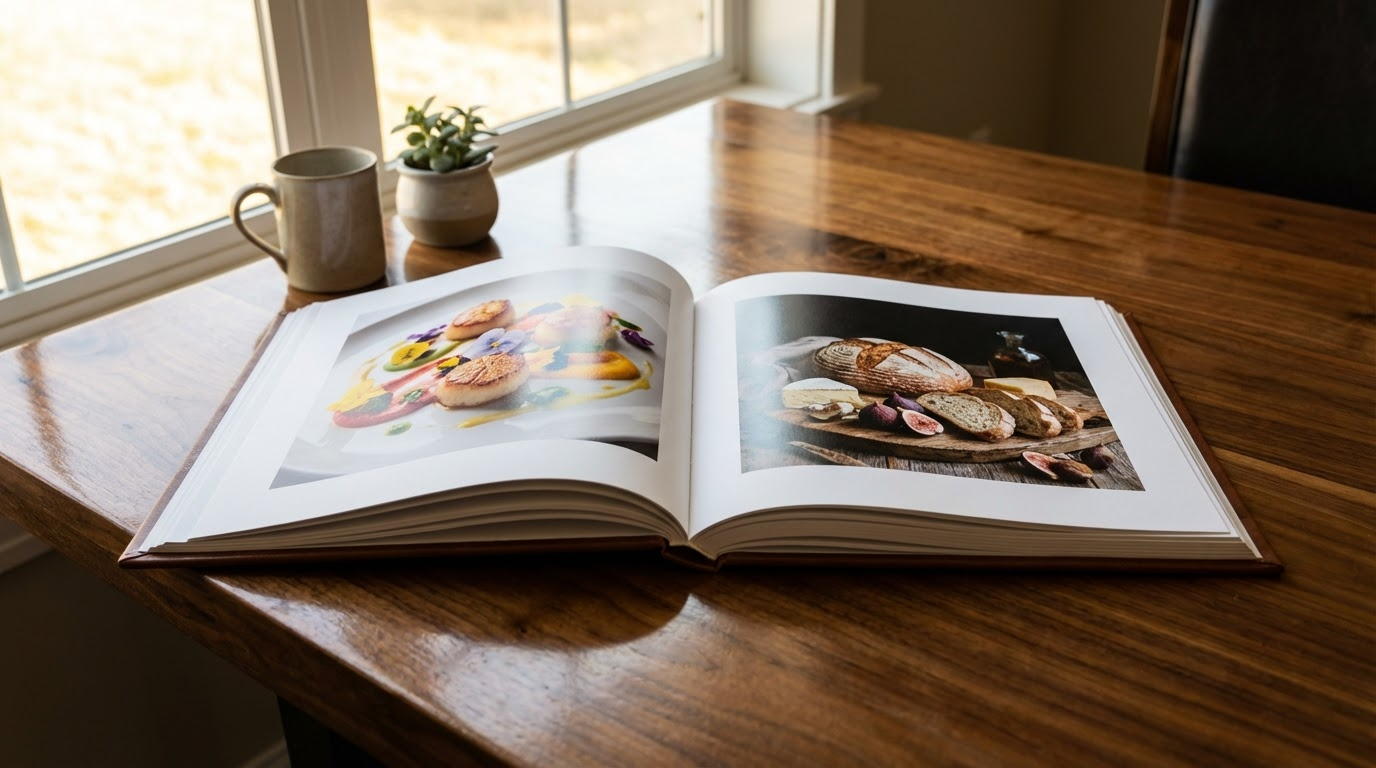
Mini Portfolio Shoots: The Fastest Way to Build a Strong, Hireable Body of Work
A strong photography portfolio isn’t the result of “shooting more” random photos, it’s the result of shooting with intention. If your current portfolio feels scattered, repetitive, or not aligned with the kinds of clients you want, mini portfolio shoots are one of the most practical ways to fix that quickly. The core idea is simple: create small, focused projects that prove specific skills in specific niches, then package those images as if they were made for a real client. That’s how portfolios become persuasive, not just pretty.
Why mini-shoots work (and why “random great photos” don’t)
Most photographers can produce a good image on a good day. What clients are really hiring is reliability and relevance: can you consistently create the style of work they need, in the situations they face? Mini-shoots let you demonstrate exactly that, without waiting for a dream job to appear. Because they’re small by design, you can create targeted work quickly, test ideas, and fill portfolio gaps on purpose instead of by accident.
The formula: Subject → Constraint → Package
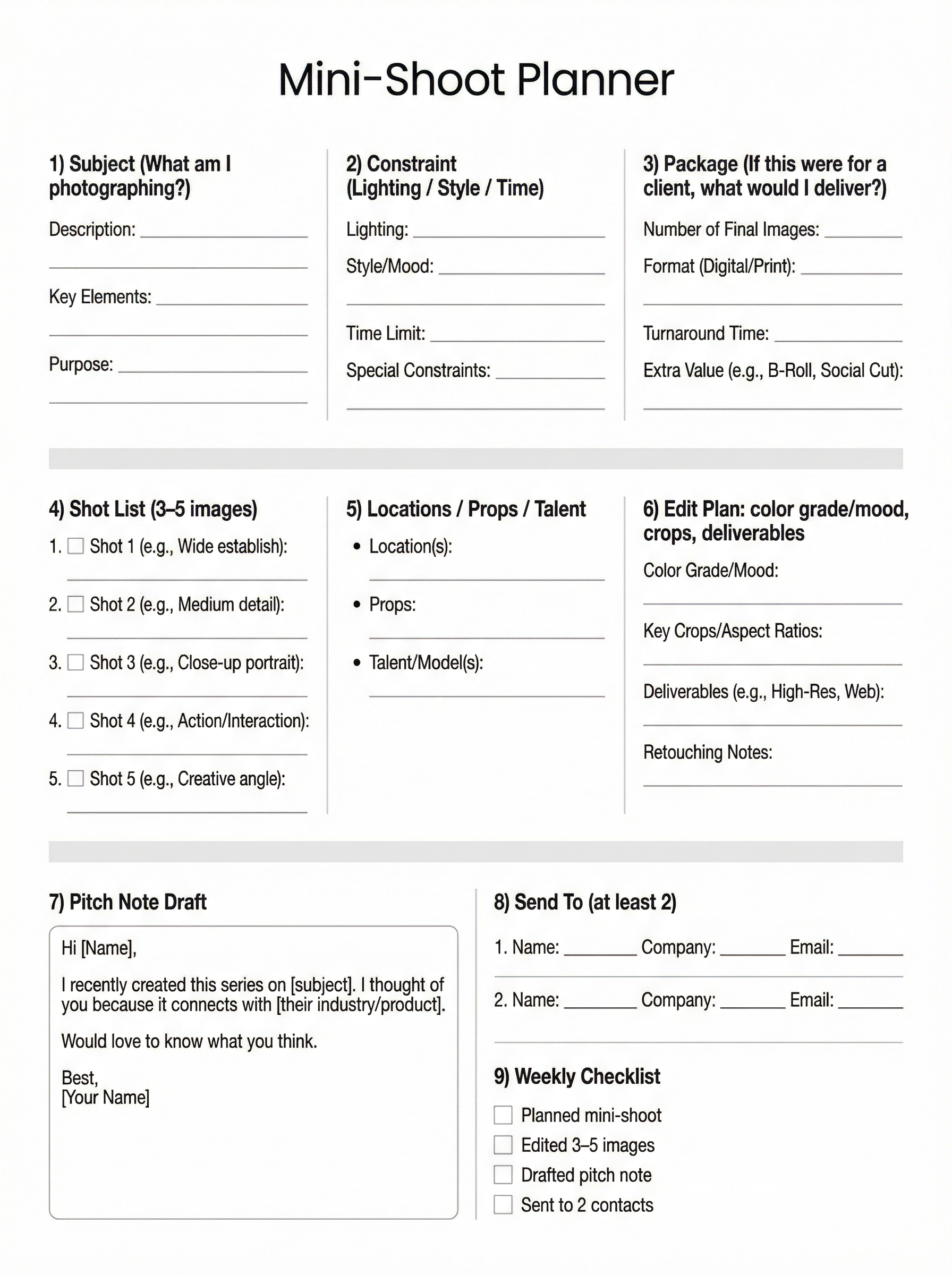
The document’s most useful framework is Subject → Constraint → Package, which keeps mini-shoots from turning into unfocused “content days.”
1) Subject (what you’re photographing)
Choose something that directly maps to a niche you want to be hired in: a barista making drinks (lifestyle + hospitality), a simple skincare product (commercial), a local maker in their studio (brand storytelling), or a elegant dish of pasta (food).
2) Constraint (the creative challenge)
Constraints make shoots efficient and portfolio-ready. Examples of this approach include: one light only, window light only, one color palette, 60 minutes total, one lens, or a specific mood (clinical, cozy, cinematic). The constraint forces you to make decisions, and the decisions you make lead to your unique style and approach.
3) Package (how you’d deliver it to a client)
This is where mini-shoots become powerful. Don’t just “post a photo.” Package the results like a real assignment: what problem does this solve, what images would the client get, and how would they use them (web banners, product page, social carousel, campaign announcement)? This turns your portfolio into a business tool.
Keep it tight: 3–5 excellent images beat 30 “pretty good” ones
Mini-shoots are about clarity. The chapter’s weekly plan points to executing the shoot and editing 3–5 strong images, which is the sweet spot for showing a cohesive concept without padding. Those few images can become a portfolio series, a targeted email attachment, or a pitch-ready PDF page.
Turn images into opportunities: send a pitch note
A mini-shoot becomes exponentially more valuable when you share it directly with people who might hire you. The workbook includes a simple pitch-note template you can adapt: “Hi [Name], I recently created this series on [subject]… it connects with [their industry/product]… would love to know what you think.” Short, relevant, and low-pressure beats a long sales email every time.
A simple weekly rhythm that compounds
To make this sustainable, follow the document’s checklist-like approach: design one mini-shoot, execute it, edit a small set of final images, draft the pitch note, and send it to at least two prospects. Over a month, that’s four focused portfolio additions and eight warm touchpoints—built deliberately toward the clients you actually want.
30-Day Portfolio Mini-Shoot Challenge Calendar
(Themes + Weekly Constraints)
Build this around the Subject → Constraint → Package method so every mini-shoot results in a tight, client-relevant set of 3–5 finished images plus a simple pitch-ready concept.
Week 1 — Light Discipline (Days 1–7)
Day 1:
“Window Light Food” — Constraint: window light only, no reflector
Day 2:
“Hard Light Still Life” — Constraint: direct sun/hard shadow shapes
Day 3:
“Night Street Scene” — Constraint: only available street/neon light (Store facade)
Day 4:
“One Lamp Editorial” — Constraint: single household lamp, warm WB
Day 5:
“Backlit Product” — Constraint: backlight only + rim highlight required
Day 6:
“Open Shade Lifestyle” — Constraint: open shade only, no mixed light (Reflectors OK)
Day 7:
“Flash Bounce Basics” — Constraint: on-camera flash bounced (wall/ceiling)
Deliverable each day: 3–5 images edited consistently. Source
Week 2 — Color Discipline (Days 8–14)
Day 8:
“All White Minimal” — Constraint: whites/neutral tones only
Day 9:
“Monochrome Red” — Constraint: red is the hero color in every frame
Day 10:
“Blue Hour Mood” — Constraint: cool palette only, no warm highlights
Day 11:
“Earth Tones Brand” — Constraint: tan/brown/olive palette
Day 12:
“Black + Metallic” — Constraint: black background + one metallic accent
Day 13:
“Pastel Soft Story” — Constraint: pastel palette + low contrast edit
Day 14:
“Two-Color Limit” — Constraint: only two colors visible (plus neutrals)
Packaging prompt: write one sentence describing where these images would live (homepage banner, product page, social carousel, etc.).
Week 3 — Story Discipline (Days 15–21)
Day 15:
“Morning Routine” — Constraint: 5-shot sequence (wake → coffee → out the door)
Day 16:
“Maker at Work” — Constraint: show hands, tools, and final product
Day 17:
“Behind-the-Scenes Mini” — Constraint: include 1 wide, 1 medium, 1 detail
Day 18:
“Before / During / After” — Constraint: triptych storytelling format
Day 19:
“A Service Being Delivered” — Constraint: client POV + provider POV
Day 20:
“A Place With Personality” — Constraint: establish → detail → human moment
Day 21:
“One Object, Three Meanings” — Constraint: change context to alter story
Edit rule: keep one consistent crop ratio for the whole set (e.g., all 4:5 or all 3:2 (all landscape or all portrait)).
Week 4 — Client Discipline (Days 22–30)
Each day: pick a real local business (or dream brand) and package the shoot as if for them.
Day 22:
“Coffee Shop Social Pack” — Constraint: 5 images for Instagram grid cohesion
Day 23:
“Skincare E-comm” — Constraint: clean background + label readable in 2 shots
Day 24:
“Restaurant Menu Story” — Constraint: 3 dishes + 2 ambience images
Day 25:
“Fitness Coach Promo” — Constraint: action + testimonial-style portrait
Day 26:
“Home Decorating Feature” — Constraint: 30-minute shoot, must include 3 items
Day 27:
“Salon / Barber Branding” — Constraint: mirror shot included, no clutter
Day 28:
“Artist Press Kit” — Constraint: 1 portrait + 1 studio wide + 3 detail shots
Day 29:
“Nonprofit Impact” — Constraint: convey mission without logos/text overlays
Day 30:
“Your Niche Signature Shoot” — Constraint: repeat the style you want hired for
Pitch note requirement: draft a short message to send with the mini-shoot images using the provided template style.
How to replace a flat background for a studio photo.
Course Details
Module Three
Two: The Practical Portfolio
Summary:
Creating a practical portfolio without breaking the bank.
Image Upload:
|
Upload files
|
|
|
|
|
|
|



|
|
Image Size: 1200 pixels on long side
IMPORTANT: IMAGE FILE NAME
SH-first-last-module-#
(Like this: SH-don-giannatti-module-1)
Meeting Notes
Quick recap
This photography mentorship class focused on reviewing participants’ product and lifestyle photography work, with Don providing detailed feedback on lighting, composition, and post-processing techniques. The group discussed various technical aspects including background lighting, depth of field control, and the use of fill cards and black cards for product photography. Don emphasized the importance of proper exposure techniques, particularly for white backgrounds, and demonstrated how to use Lightroom masks and NIK software for enhancing images. The class also covered marketing strategies using AI tools like ChatGPT and Gemini for outreach to potential clients, with Don providing specific prompts and examples for crafting professional emails to manufacturers and businesses.
Next steps
- Bryan: For future product shoots, bracket exposures (e.g., F8, F11, F16, F22) to provide client options for depth of field.
- Bryan: Lighten whites and match brightness across images of the same product set in Lightroom, especially where whites differ between shots.
- Bryan: Clone out or remove distracting tabletop edges from product images as suggested.
- Bryan: Add vignette or darken background slightly in images where attention should be drawn to the product/card.
- Frank: Adjust exposure so that white backgrounds are true white, using histogram and adjusting as per Don’s instructions.
- Frank: Add black cards behind clear bottles to create a defined edge/reflection when shooting on white.
- Frank: Use Goo Be Gone and a razor to remove unwanted labels from bottles when necessary.
- Kevin: Fix seam visible in Firehouse Subs container image in post-production.
- Kevin: Add a subtle black line in Photoshop to define the edge of the whiskey bottle against the white background if shooting for a client.
- Matthew: Control and correct color using a gray card and black point/white point settings in Lightroom or Capture One.
- gizmo: Fix horizon alignment in product images and lighten foreground as needed using masks or gradients in Lightroom.
- gizmo: Move white fill cards closer to set when shooting to increase fill light, then adjust as needed.
- gizmo: Use the remove tool (or Photoshop healing) to clean up misaligned foam runway pieces in product shots.
- All participants: Review Saturday/Sunday meeting video for additional AI/marketing content as assigned by Don.
- All participants: Send 3-4 outreach emails per day to potential clients using provided AI prompts and track responses (CRM optional, but tracking required).
- All participants: Prepare 3 images “in your lane” and 2 “knot in your lane” for next week’s review.
Summary
AI Photography and Marketing Strategies
Don discussed the transition from basic photography techniques to marketing strategies for the group’s creative work. He emphasized the importance of embracing AI tools in photography, noting that technology has consistently progressed and will continue to do so. Don mentioned plans to spend time exploring AI prompts and editing techniques, including specific tools for Lightroom and Capture One. The conversation briefly touched on potential travel plans to Arizona and included personal anecdotes about driving across the southwestern United States.
Jewelry Photography Commercial Guidelines
Don provided guidance on photography techniques for jewelry, explaining that traditionally old jewelry should appear unpolished when commercially shot. He advised that while personal work can be done as desired, commercial work requires meeting client needs and legal requirements, such as not altering real estate photos. Don reviewed Beckystinehour’s photos of a princess squash necklace and praised the mountain-themed jewelry setup presented by Bryan, while also suggesting to shoot with different aperture settings to accommodate client preferences for both sharp and blurry backgrounds.
Photography Feedback and Technical Tips
Don reviewed Bryan’s photography work, providing feedback on lighting, color balance, and composition techniques. Don suggested using Lightroom to adjust whites and apply vignettes to improve the images’ overall appearance. The discussion included technical advice about using fill cards, managing window light, and creating proper gradients in photography. Don also briefly mentioned Frank’s work involving wine and M&Ms, though the specific feedback was not captured in the transcript.
Photography Histogram Exposure Techniques
Don provided guidance to Frank on photography techniques, focusing on histogram analysis and lighting adjustments. Don explained how to properly expose a white background by first shooting it alone and adjusting the histogram to find the right exposure level, then opening up the camera by approximately one-third stop to achieve a perfect white background. Don emphasized the importance of controlling light levels to avoid flare and maintain sharp edges, recommending specific exposure adjustments based on histogram readings.
Camera and Lighting Setup Review
Don provided guidance on camera settings, clarifying that the aperture should be set to 7.3 for proper exposure. He reviewed Frank’s product photography setup, suggesting adjustments to background lighting and exposure to avoid underexposure while maintaining clarity. Don also noted that Frank’s diffusion setup was creating shadows, recommending the use of additional light panels or a new scrim to improve lighting consistency.
Whiskey Bottle Photography Techniques
Don and Kevin discussed techniques for photographing a whiskey bottle, focusing on lighting and composition. They reviewed Kevin’s setup, which included lights, reflectors, and fill cards, and Don provided feedback on improving contrast and handling the challenging aspects of the bottle’s shape and label. Don emphasized the importance of using black cards for controlled shadows and suggested using bottles with properly aligned labels to streamline post-processing. They also discussed practical considerations for shooting product photography, including sourcing appropriate bottles and managing time efficiently.
Product Photography Lighting Techniques
Don and Kevin discussed photography techniques for product and food shots, focusing on lighting, background setup, and post-processing. Kevin shared his process for shooting a Firehouse Subs sandwich, including using a cutting board and Ulanzi LED strip for lighting. Don provided feedback on improving the composition, particularly addressing the placement of the logo and avoiding seams in packaging shots. Bryan asked about handling logos over seams in packaging, and Don advised requesting another item if possible or adjusting the shot in post-processing for professional work.
Photography Color Consistency Techniques
Don and Matthew discussed techniques for controlling color consistency in photography. Don advised using a gray card to set proper white balance, suggesting values around 125-155 for neutral tones. Don also recommended using Photoshop’s photo filters instead of physical CTO gels to achieve warming effects, allowing for more precise control over the intensity. When reviewing Matthew’s Bertoli bottle photo, Don noted that any imperfections in the reflection were likely due to the bottle itself rather than the photography, and suggested backing off the CTO gel which was making the image too warm.
Photo Composition and Lighting Tips
Don provided feedback on photo composition and lighting techniques to Gizmo. He suggested fixing the horizon line and adjusting the lighting by using masks in Lightroom or Capture One, recommending the use of NIK Viveza for balancing exposure. Don also advised on proper placement of fill cards, suggesting starting them close to the subject and then adjusting as needed.
Photography Feedback and Equipment Tips
Don provided feedback on various photography images, suggesting adjustments like using radial gradients for better lighting, applying Gaussian blur to reflections, and fixing crooked compositions. He recommended specific camera lenses for studio work, including 35mm, 40mm, 50mm, 60mm, 85mm, and 100mm options, and mentioned his plan to use a Mamiya adapter with his Canon camera. The discussion concluded with Don advising against purchasing Hub AI tools, instead recommending the free versions of ChatGPT and Gemini for those interested in AI assistance.
AI Tools for Client Outreach
Don demonstrated how to use AI tools like ChatGPT and Gemini for outreach to potential clients, specifically showing how to craft targeted emails to manufacturers. He emphasized the importance of a systematic approach to client outreach, including tracking contacts in a CRM system and sending personalized emails over time to build relationships. Don assigned participants to send 3 outreach emails in their specific photography niche and 2 general outreach emails for next week’s review.